






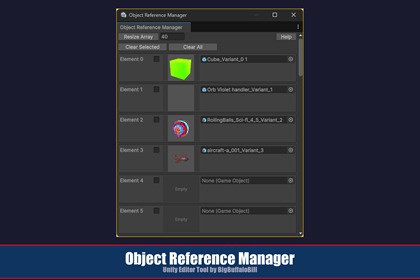
Object Reference Manager is a editor extension that gives you a dedicated window for storing, organizing, and reusing GameObject references across your project.Note: This tool will eventually be offered as part of a package of Editor Utilities, but I don't know how soon. If you do buy this now any amount paid will be deducted from the package amount later only to a maximum discount (if you had bought multiple individule tools) that the package is free. But, if you buy the package later you get all the tools therein plus any new ones added over time.Tool DocumentNote on ExpectationsObject Reference Manager is an editor extension that gives you a dedicated window for storing, organizing, and reusing GameObject references across your project. Instead of hunting through deep folder hierarchies or losing track of frequently used assets, you can keep them all in one dockable panel — complete with 64×64 thumbnail previews — and drag them directly into your scenes.What sets Object Reference Manager apart is its automatic prefab variant workflow. When you drag a scene object into the manager, it detects that the object is not yet a persistent asset and automatically creates a prefab variant in a dedicated Prefabs subfolder. This means you never accidentally store a reference to a transient scene object that would break the next time you reload. Every reference in the manager is guaranteed to point to a real, saved asset.The tool stores all its data in a single ScriptableObject asset, so your reference list persists across Editor sessions, domain reloads, and even source control operations. It uses self-resolving asset paths — the window locates its own data files at runtime based on where the script is installed, so it works regardless of where you place it in your project and is fully compatible with symlinks and custom folder structures.Key FeaturesPersistent GameObject reference array stored in a ScriptableObject asset that survives Editor restarts and domain reloadsAutomatic prefab variant creation — scene objects dragged into slots are automatically converted to prefab assets saved in a Prefabs subfolderDrag-out support — drag objects from the manager window directly into the Scene view or Hierarchy via their thumbnail previews64×64 asset preview thumbnails for every slot, providing quick visual identificationRow selection via checkboxes with bulk Clear Selected and Clear All operationsResizable array with a confirmation dialog to prevent accidental data lossRight-click context menu on thumbnails to clear individual object referencesSelf-resolving asset paths — uses MonoScript.FromScriptableObject to locate its own install directory at runtime; no hardcoded paths, fully symlink-safeZero configuration — data asset and Prefabs folder are created automatically on first useScrollable interface that handles arrays of any sizeRequirementsVersion: 2020.3 LTS or later (uses PrefabUtility.SaveAsPrefabAsset, AssetPreview.GetAssetPreview, and MonoScript.FromScriptableObject, all available since 2018.4+; tested and recommended on 2020.3+)Render pipeline: Any (URP, HDRP, Built-in) — this is an Editor-only tool with no runtime dependenciesDependencies: None. Uses only built-in editor APIs Platform: Works on all platforms supported by the editor (Windows, macOS, Linux)InstallationTypical Package Manager InstallationAfter purchasing Object Reference Manager on the Asset Store, click the Open button on the store page. This automatically opens the Package Manager window in your editor and navigates to My Assets with the package selected.In the package details panel, click Download to download the package to your machine. A progress bar will appear while the download completes.Once the download finishes, the button changes to Import. Click it to begin importing.The Import Package dialog appears with all package contents pre-selected. Optionally uncheck any items you do not want to include, then click Import.The Package Manager places the imported files into your project’s Assets folder, where they are accessible from the Project window.After ImportAllow to compile the newly imported scripts. Once compilation finishes, the tool is ready to use — no additional setup is required. The following assets will be present in your project:Assets/BBB/ObjectReferenceManager/├── Editor/│ └── ObjectReferenceManager.cs├── ObjectReferences.cs├── ObjectReferenceManagerData.asset (created automatically if missing)└── Prefabs/ (created automatically on first use)AI used as a reference like google for coding API details and minor bits of boilerplate. All design and creative via my experience as a career software engineer.

