






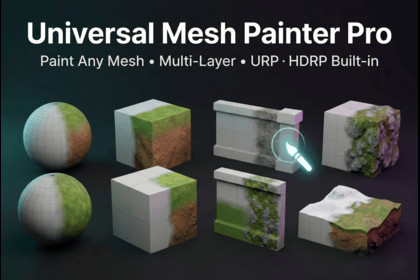
Universal Mesh Painter lets you paint multiple blended textures on any 3D mesh directly inside Unity. Works with Built-in, URP, and HDRP using a fast, non-destructive workflow.Universal Mesh Painter is a powerful multi-layer texture painting tool that allows you to paint directly onto any 3D mesh inside the Unity Editor. It works on planes, cubes, modular assets, props, large environments, and even terrain — providing a flexible alternative to terrain-only painting systems.The tool features real-time painting, adjustable brush controls, smooth texture blending, layer-based workflows, tiling and color adjustments, and support for custom brush masks. Painting is non-destructive and optimized for performance, making it ideal for fast iteration during environment production.CUSTOMIZATION & FLEXIBILITYAll painting layers are fully customizable. Users can:- Add or remove texture layers- Adjust tiling, opacity, and color tint- Import custom textures and brush masks- Control blending and falloff behaviorThe system is compatible with Built-in, URP, and HDRP render pipelines.SUITABLE FORThis tool is genre-independent and suitable for:- Stylized games- Realistic environments- Open-world projects- Survival and RPG games- Modular level design- Rapid prototyping- Indie and professional productionsUniversal Mesh Painter adapts to any art style and workflow, making it a versatile solution for a wide range of Unity projects.- Paint directly on any 3D mesh inside the Unity Editor- Multi-layer texture painting system- Real-time GPU-accelerated brush painting- Smooth texture blending with adjustable falloff- Custom brush texture support- Adjustable brush size, opacity, hardness, and spacing- Layer tiling, offset, and color tint controls- Add, remove, and reorder texture layers- Non-destructive painting workflow- Works on planes, cubes, modular assets, props, and terrain- Compatible with Built-in Render Pipeline- Compatible with Universal Render Pipeline (URP)- Compatible with High Definition Render Pipeline (HDRP)- Clean and intuitive editor UI- Optimized for performance and large meshes- Designed for environment artists and level designersAI USAGE DISCLOSUREArtificial Intelligence (AI) tools were used during the development process to assist with scripting support and code optimization.AI was primarily used to:- Help generate initial code structure drafts- Suggest algorithm improvements- Assist with debugging and refactoring- Improve code clarity and documentationAll generated content was reviewed, modified, tested, and validated manually to ensure correctness, performance, and compliance with Unity standards.No AI-generated art, textures, audio, or third-party copyrighted assets are included in this package. All final scripts, shaders, and systems were fully verified and integrated by the developer.AI was used strictly as a development assistant, and all functionality and implementation decisions were finalized and controlled by the developer.

