






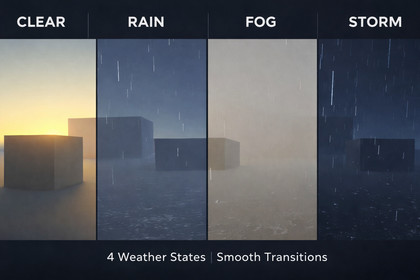
Modular URP weather system with smooth transitions between Clear, Rain, Fog and Storm. Controls light, fog, particles, skybox and audio.URP Dynamic Weather System is a plug-and-play weather framework built exclusively for Unity's Universal Render Pipeline.Define weather states as ScriptableObject assets and blend between them at runtime with full AnimationCurve easing. Transitions can be interrupted at any time without visual popping — the system automatically captures a snapshot of the current visual state and transitions from there.Includes five independent modules: directional light and ambient color control, exponential squared fog, particle-based rain that follows the camera, skybox tint and exposure blending, and a dual-AudioSource crossfade system synced to transition duration.Four production-ready presets are included (Clear, Rain, Fog, Storm) along with a custom Inspector with live preview, a one-click preset generator, and a runtime demo UI that requires no Canvas or Input System package.The modular architecture makes it easy to extend: inherit from WeatherModule, implement one method, and add your component as a child of the WeatherSystem GameObject — the manager discovers it automatically.• Unity 2022.3 LTS or newer — Universal Render Pipeline only (Built-in and HDRP not supported)• 5 built-in modules: LightModule, FogModule, RainModule, SkyModule, AudioModule• ScriptableObject-based weather states — fully serialized, no code required to create new presets• Coroutine-based transitions with AnimationCurve easing and interruption-safe snapshot system• Rain particles: world-space simulation, stretch rendering, follows Camera.main automatically• Skybox blending via runtime material instancing — original asset is never modified on disk• Audio crossfade using two AudioSources — no clip restart when source and target share the same clip• Assembly Definition files (.asmdef) for clean build isolation• Custom WeatherManager Inspector with live transition preview and progress bar• One-click preset creator: Assets > Create > Dynamic Weather System > Create Sample Presets• Runtime OnGUI demo UI — no Canvas, no Input System dependency• Full XML documentation on all public API• No third-party dependencies

