






SafePoint PRO: Backup & Restore (Automatic Checkpoints)
Intelligent Labs
$16.49
$32.99
50%OFF
(no ratings)
Jump AssetStore
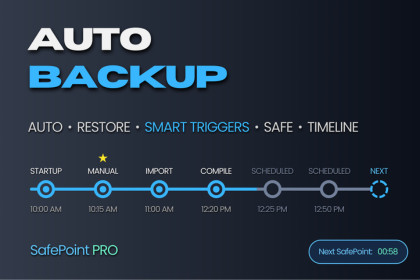
Automatically creates Safe Points before every critical moment. Restore to any point in seconds. Including: Automation modes & Smart triggers.How It Works ?SafePoint PRO monitors your Unity Editor for critical events and automatically creates a named SafePoint before each one. Every SafePoint is labeled by context - "Before Build", "Before Compile", "Startup" (and more) - so you always know exactly what you're restoring to.When something goes wrong, open the timeline -> select your point -> click Restore. Done.SafePoint PRO: User Documentation🛡️🛡️🛡️ Key Features 🛡️🛡️🛡️Automatic SafePointsRestore points are created automatically — no manual action needed. Configure how often and at which events SafePoints are created using one of four Automation Plans.9 Smart TriggersSafePoints are created automatically at:✅ Project Startup✅ Scheduled Interval✅ Before Play Mode✅ Before Script Recompile✅ Before Build✅ Before Package Import✅ Before Platform Switch✅ Before Restore✅ and Manual.4 Automation PlansChoose your level of protection:✅ OFF - Manual only✅ SAFE - Balanced, fixed time intervals✅ ADVANCED - All 9 triggers active, maximum safety✅ CUSTOM - Pick your triggers, set your own interval and SafePoint limitsUnity Package Export✅Export your project as a .unitypackage file in one click.✅Auto-named and timestamped. Import into any Unity project instantly.⭐ FavoritesPin your most critical SafePoints as Favorites. Favorites are always accessible and are never auto-deleted — no matter how many new SafePoints are created.💎Backup Scope ControlChoose exactly which folders are included in every SafePoint. A live size estimate updates in real time so you always know how much space you're using.Who Is It For?SafePoint PRO is built for any Unity developer who values their work. No matter your skill level, project size, or workflow - your work has value and it deserves to be protected -> SafePoint PRO has you covered.Why SafePoint PRO?✅ Zero setup -- works immediately after import✅ Runs automatically in the background✅ Every SafePoint is named so you always know what to restore✅ Pin critical SafePoints as Favorites✅ Lightweight backups -- typically under 1 MB per SafePoint✅ Full folder-level control over what gets backed up✅ Focus on building -- no worries.SafePoint PRO: User Documentation❓ Frequently Asked Questions ❓What is a SafePoint?A lightweight backup of your project created automatically at critical moments — before a build, compile, import, and more. Each one is named by context so you always know what to restore.Does it work with Git, SVN, or Plastic?Yes. SafePoint PRO works alongside any version control. It fills the gaps Git doesn't cover — mid-session crashes, bad compiles, and broken imports between commits.Does it slow down the Unity Editor?No. It runs silently in the background and only activates at trigger moments. Zero impact on Editor performance.How much disk space does it use?A typical SafePoint is under 1 MB. You control which folders are included and how many SafePoints to keep, so storage stays predictable.Can I choose what gets backed up?Yes. The Backup tab gives you full folder-level control. Large binary assets like textures and audio are excluded by default to keep backups small and fast.What happens when I reach the SafePoint limit?The oldest SafePoints are removed automatically. Favorites are always protected and never auto-deleted.Can I restore without overwriting my current project?Yes. Restore as Copy restores any SafePoint into a separate folder, leaving your current project completely untouched.Do I need to configure anything before it starts working?No. It works immediately after import with zero setup. Full protection starts the moment you open your project.Is this a one-time purchase?Yes. One-time purchase. No subscriptions, no recurring fees, no internet connection required.Unity SafePoint PROGo Back In Time. Anytime.Intelligent Labs ❤️Unity Version: 2021.3 LTS and aboveTested Up To: Unity 6Platform: Windows, macOSEditor Only: Yes — no runtime componentsDependencies: NoneBackup Format: .unitypackage & native Unity project structure

