






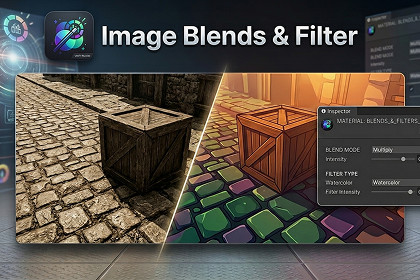
Image Blends&Filter lets you easily blend colors or images, apply 12 blend modes and 16 filters, and tweak intensity or tints—perfect for UI, sprites, textures, and runtime effects in Unity.Image Blends&Filter – Advanced Image Blending & Filtering for UnityImage Blends&Filter is a powerful and easy-to-use Unity plugin that lets you blend colors or images onto other images, textures, or backgrounds with professional-grade results. Perfect for UI, 2D sprites, 3D textures, or post-processing effects, this plugin gives you complete control over your visuals with just a few clicks.Key Features12 Blending Modes: Multiply, Screen, Overlay, SoftLight, ColorDodge, Hue, Saturation, Color, Luminosity, Difference, Subtract, Divide.16 Image Filters: Brightness, Contrast, Saturation, HueShift, Exposure, GammaCorrection, Vibrance, Colorize, Black & White, WarmCool, Vintage, Sketch, Toon, OilPaint, Watercolor, Posterize.Adjustable Parameters: Control intensity, hue shift, posterize steps, and color tint to fine-tune your effects.Pipeline Compatibility: Works seamlessly with Built-in, URP, and HDRP render pipelines.Easy to Use: Drag-and-drop materials onto images or textures, or process textures at runtime using Graphics.Blit().Flexible Output: Apply effects to UI elements, sprites, textures, or fully rendered scenes.Why Choose Image Blends&Filter?Quickly create stunning visual effects for games, AR/VR apps, and interactive experiences.Transform ordinary textures into vibrant, artistic visuals without external software.Real-time preview and adjustable parameters make iteration fast and intuitive.Works across all major platforms supported by Unity: Windows, macOS, Android, and iOS.Use CasesEnhance UI and HUD elements with custom blends and filters.Stylize textures before applying them to 3D models.Add post-processing effects to rendered frames for cinematic quality.Export processed textures for dynamic UI, texture baking, or runtime effects.How It WorksAdd Image or Texture – Use a UI Canvas image or a GameObject with a texture.Apply Material – Drag the desired blend/filter material onto your image or process at runtime with Graphics.Blit().Configure Options – Adjust blend modes, filters, intensity, hue, posterize steps, or color tint.Preview & Test – Play your scene and tweak parameters in real-time for perfect results. Platforms: Windows, macOS, Android, iOS Unity Version: 2021 or later Render Pipelines: Built-in, URP, HDRPBlending Modes (12): Multiply, Screen, Overlay, SoftLight, ColorDodge, Hue, Saturation, Color, Luminosity, Difference, Subtract, Divide Image Filters (16): Brightness, Contrast, Saturation, HueShift, Exposure, GammaCorrection, Vibrance, Colorize, Black & White, WarmCool, Vintage, Sketch, Toon, OilPaint, Watercolor, PosterizeAdjustable Parameters: Intensity, Hue Shift, Posterize Steps, Color Tint Shader Support: GPU-optimized shaders compatible with Graphics.Blit() for runtime processing Use Cases: UI, 2D/3D textures, runtime effects, post-processing, texture bakingLightweight, real-time adjustable, and fully compatible across all supported pipelines.This package includes documentation and promotional materials generated with AI assistance (ChatGPT, DALL·E). All scripts, logic, and core functionality were manually developed by the author.

