






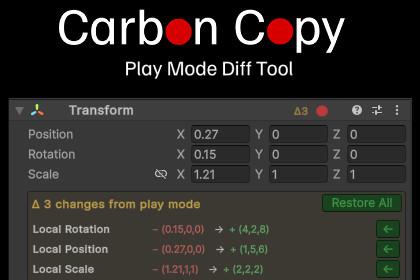
Never lose play mode tweaks again with Carbon Copy! Record play mode changes, and restore in edit more with a visual diff system that clearly shows changes and restores properties with one click.Never lose your perfectly tuned Play Mode adjustments again!Carbon Copy captures component values when you enter play mode, then shows you exactly what changed when you exit with a visual diff system. Restore individual properties with a single click, or cherry-pick exactly what you want to keep. No more screenshots, no more manual retyping, no more approximating values from memory. Tracks your Play Mode changes and restore them with one click.Just mark which components you want to track before hitting Play. Carbon Copy snapshots their values, watches for changes during Play Mode, and when you exit, shows you exactly what changed in the Inspector. Click the restore arrow next to any property to bring it back. Or restore everything at once. Your tweaks are preserved, not lost.Core FeaturesSmart Detection: Automatically detects every value that changed during Play Mode Live Highlights: See changes in real-time with yellow highlights while playing Visual Diffs: Clear before/after comparison for every changed propertyCherry-Pick Restore: Restore individual properties or entire components Full Undo Support: Every restore can be undone with Ctrl+Z Flexible Tracking: Track specific components or entire GameObjects Zero Setup: Works immediately with any component typeHow It WorksClick the ○ Record button on any component header (or Record All on the GameObject)Enter Play Mode and tweak values normally, you'll see a realtime diff.Exit Play Mode — Carbon Copy shows a diff below each changed componentClick ← next to any property to restore it, or Restore All for the whole componentYour Play Mode tweaks are now permanent in Edit ModePerfect ForGame Feel Iteration: Refine movement, jumping, and physics valuesVisual Polish: Tweak camera positions, lighting, and post-processingAudio Tuning: Get sound volumes and effects exactly rightUI Refinement: Fine-tune layouts, animations, and transitionsRapid Prototyping: Test changes fast without manual note-takingSupports all property types: floats, ints, bools, strings, colors, vectors, curves, gradients, enums, and object references.Stop losing your Play Mode tweaks and stop tedious screenshots. Get Carbon Copy and make your Play Mode changes permanent!Editor-Only Tool – Does not affect runtime builds.Compatibility:Unity 2021.3 LTS and newer (tested up to 6000.1.x).Supports Built-in Render Pipeline, URP, and HDRP.Platforms: All (Windows, macOS, Linux) - editor functionality only.Dependencies: None - no external packages required.Installation:Import the package.Open Tools → Carbon Copy → Settings

