






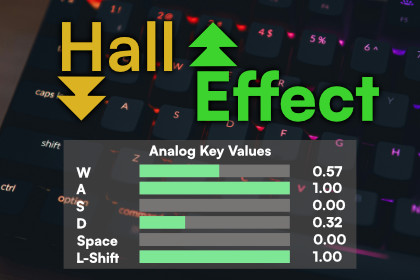
Read per-key analog pressure (0.0–1.0) from Hall Effect keyboards in Unity's Input System. Pressure-sensitive movement, sprint, and more.HE Keyboard is a pure C# scripting package with no shaders, materials, or render pipeline-specific assets. It works with any render pipeline: Built-in, URP, HDRP, or custom SRPs. The example scene uses Kenney 3D model kits (CC0) with materials authored for the Built-in Render Pipeline — if your project uses URP or HDRP, run Unity's material converter on the demo scene. Analog input is unaffected.HE Keyboard brings Hall Effect analog keyboard support directly into Unity's Input System. Instead of binary on/off key states, your game reads continuous pressure values from 0.0 to 1.0 — enabling smooth, pressure-sensitive movement, variable sprint speeds, analog throttle control, and any mechanic that benefits from knowing how hard a key is pressed.Drop in and go. Add the HEKeyboardManager prefab to your scene, bind your Input Actions to controls, and you're reading analog values. The included AnalogDpad composite converts WASD into a smooth Vector2 that preserves pressure magnitude — no more snapping between -1, 0, and 1.Works alongside standard input. Players without an HE keyboard aren't left behind. Add regular bindings as fallbacks and the same Input Actions work for everyone. No HE keyboard plugged in? No errors — the package gracefully degrades.Built for production. Zero GC allocations per frame, thread-safe device event handling, and hot-plug support. The native SDK wrapper handles platform-specific loading quirks (including the macOS dlopen fix that trips up most native plugins) so you don't have to.What's included:Playable driving example scene — a simple car demo showcasing analog throttle, brake, and steering with on-screen pressure bars900+ lines of documentation with platform-specific setup guides, multi-vendor keyboard information, and troubleshootingEditor debug window for live analog value inspectionSetup validator to catch common misconfigurations, including Universal Analog Plugin detectionPre-configured Input Actions asset ready to extendNative plugins for Windows (x64), macOS (Universal), and Linux (x64)Supports Wooting keyboards on Windows, macOS, and Linux via the Wooting Analog SDK v0.8.0. Other HE keyboard brands — including Razer, NuPhy, DrunkDeer, Keychron, Lemokey, and Madlions — are supported on Windows and Linux via the community-driven Universal Analog Plugin (AnalogSense). macOS builds of the Universal Analog Plugin are not currently available, so on macOS, Wooting is the only supported vendor today. The architecture is designed for continued expansion as the HE keyboard ecosystem grows.Input System Integration:Custom InputDevice (AnalogKeyboardDevice) with 105 individually-mapped analog keysAnalogDpad composite for smooth Vector2 movement from WASDFull Input Actions support — bind, rebind, and read values like any Unity input deviceBoth direct API access (AnalogKeyboardDevice.current) and Input Action workflowsPerformance:Zero GC allocations — polling uses stack-allocated buffersEfficient read_full_buffer polling (single native call per frame, only returns pressed keys)Thread-safe device event marshalling via ConcurrentQueuePlatform Support:Windows x64macOS Universal (Intel + Apple Silicon)Linux x64Built-in macOS dlopen preload fix for reliable native library loadingEditor Tools:Live Debug Window (Window > Analysis > HE Keyboard Debug)Setup Validator with Universal Analog Plugin detection (Tools > KrookedLilly > Validate HE Keyboard Setup)Custom HEKeyboardManager inspector with SDK status displayIncluded Content:Driving example scene — analog throttle, brake, and steering with on-screen pressure barsPre-configured Input Actions assetDrop-in HEKeyboardManager prefabComprehensive getting-started guide, multi-vendor keyboard documentation, and API referenceSample scripts for basic and advanced usageSupported Keyboards:All platforms (Windows / macOS / Linux): Wooting keyboards via the Wooting Analog SDK v0.8.0Windows and Linux: Razer, NuPhy, DrunkDeer, Keychron, Lemokey, Madlions, and others via the community-driven Universal Analog Plugin (AnalogSense)macOS: Wooting only (Universal Analog Plugin does not currently ship macOS builds)Requirements:Unity 6 (6000.x) or laterUnity Input System package (1.18.0+)Wooting Analog SDK runtime installed on the development/target machine (not bundled — see documentation for platform-specific install instructions)Hall Effect keyboard connected via USB (Bluetooth/wireless does not support analog readout)SDK: Wooting Analog SDK v0.8.0 (MPL-2.0). Native wrapper plugins are bundled; the SDK runtime is installed separately.AI (Claude Code) was used as a development assistant throughout the package creation process. This includes code generation, architecture design, writing unit tests, documentation authoring, and debugging. All AI-generated code was reviewed, tested, and validated by the developer. The final package is 100% human-supervised C# source code with no AI runtime components.

