






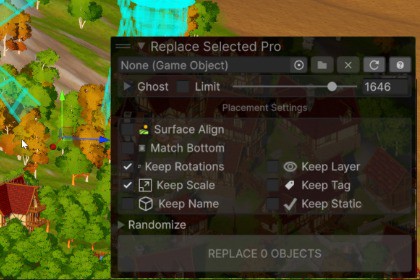
Speed up your level design! A high-performance Editor Overlay that instantly replaces multiple scene objects with prefabs. Preserve original rotations, align to terrain, and randomize in seconds.Strictly code-based Editor tool; contains no rendering assets and is fully compatible with Built-in, URP, and HDRP.B2C3D Replace Selected Pro is a lightweight, high-performance Editor Overlay designed to eliminate the tedium of manual object swapping in Unity. Whether you are replacing early greybox meshes with final art, scattering environment props, or iterating on a modular construction system, this tool allows you to swap hundreds of objects instantly without losing your careful scene layout.Because it is built on Unity's modern Overlay system, it docks cleanly directly into your Scene View—no more clunky floating windows. It is completely genre-agnostic and invaluable for level designers, environment artists, and technical artists working on anything from dense FPS maps to sprawling RPG landscapes. The tool is highly customizable, letting you tweak visual ghosting colors, UI states, and exact randomization bounds to fit your project's specific workflow.SupportDiscordNative Editor Overlay: Integrates directly into the Scene View toolbar. Fully dockable and completely unintrusive.Live Ghost Previews: Renders a transparent, color-customizable mesh preview of your replacements before you commit. Includes a culling distance slider to maintain high framerates in dense scenes.Smart Surface Alignment: Optional downward raycasting to instantly snap the new object's position and rotation to the terrain or ground normal below it.Match Bottom Bounds: Automatically calculates and aligns the bottom bounding box of the new mesh to the original object's base. Perfect for swapping walls, fences, or pillars of varying heights.Metadata Preservation: Granular toggles to precisely transfer the original object's Transform data (Keep Rotation, Keep Scale) and identity (Keep Name, Keep Layer, Keep Tag, Keep Static Flags).Advanced Randomization: Apply per-axis (X, Y, Z) rotation limits and custom Min/Max uniform scaling ranges. Roll new random seeds with a single click to rapidly iterate on visual variety.Full Undo/Redo Integration: Natively hooked into Unity's Undo stack. Instantly revert massive bulk replacements or accidental UI tweaks with Ctrl+Z.Persistent Preferences: Uses native ScriptableSingleton architecture. Your tool settings save automatically and survive domain reloads and Editor restarts perfectly.Pipeline Agnostic: 100% C# code. Contains no materials or shaders, making it fully compatible with the Built-in, URP, and HDRP pipelines out of the box.Through a step-by-step process, AI was utilized to help build scripts that are clean, modular, and easy to maintain. AI tools also provided guidance on project structure and drafting the user guide and help information in the tool.

