






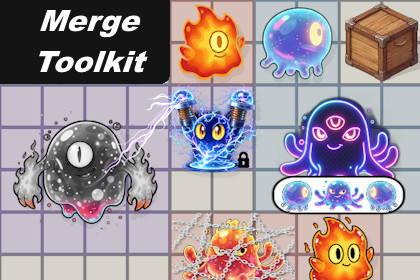
Complete toolkit for building Merge games in Unity. Features multi-cell chips, generators, containers, power boosters, and a blocker/destroying effects system — all wired through Dependency Injection.The ultimate, most functional, and flexible Merge Toolkit - Base! Build your dream game with seamless scalability and dynamic visuals, all while keeping the core architecture intact.──────────────────────🛠 Extensions & Customization──────────────────────Designed with extensibility at its core, allowing you to build unique mechanics on a stable foundation.VContainer Integration — swap any service (moving logic, grid management, etc.) by simply registering your implementation in a custom LifetimeScope.Custom Chips — extend the base Chip class to create specialized logic (like the included Generators and Containers).Modular Effects — chips bind to effect interfaces, not implementations; replace or add visual feedback via independent prefabs without touching core logic.Test-Driven Extensions — included recommended workflow for building and verifying new mechanics using the integrated testing framework.Full details: GitHub - Extension Guide──────────────────────♟Chips──────────────────────Chip Merging & ProgressionCombine two compatible chips to create a result chip determined by their types and merge rules (with weighted random outcomes if multiple results are possible). If merge rules specify an extra chip, there's a chance an extra chip spawns on a nearby free cell.Full details: GitHub - ChipChip Generator — Manual & AutoFlexible generation system supporting both manual (player-triggered) and automatic modes. Charge-based progression with configurable recharge timers and total lifespan. Generators evolve into different chip types after specified recharge cycles. Built-in free-cell detection ensures optimal chip placement; generators intelligently transform when grid space is unavailable.Full details: GitHub - ChipGeneratorChip ContainersCollect specific chips to complete containers through flexible requirements based on type or ID. Track completion with the visual effect system. Containers transform into result chips upon fill.Full details: GitHub - ChipContainerChip Power BoosterA special chip that boosts parameters of neighboring chips — for example, speeding up nearby generators. Automatically tracks neighbors and visualizes active connections.Full details: GitHub - ChipPowerBooster──────────────────────♟ Multi-cell Chips──────────────────────Chips can occupy any N×M area on the grid.Top-left anchor: position always refers to the anchor cell. Secondary cells reference back to the chip. Clicking anywhere on a large chip resolves correctly.Chip Relocation: when a merge result needs more space than its parents occupied, neighboring chips move aside automatically. Chips are sorted by size before relocating — larger chips are placed first to reduce fragmentation. If any neighbor has nowhere to go, the whole operation cancels cleanly. No partial field state.Full details: GitHub - Multi-cell Chip and GitHub - ChipRelocation──────────────────────🎨 Effects──────────────────────Effect base class with Animator integration (Activate/Deactivatetriggers, safe trigger reset). Ready-to-use effects included:Blocker effects:BoxEffect — blocks chip actions; progressively destroyed by neighboring mergesChainsEffect — blocks chip actions; destroyed on the first neighboring mergeMove Locked — prevents chip from being dragged; triggers shake feedback on attemptOther effects:Merge Available — activates when chip is valid for mergeCell Highlight — highlights cells under chipContainer Requirements — displays item icons required by containerGenerator Charged — activates when generator is fully chargedGenerator Charging — shows generator charging progressPower Booster Connector — highlights neighboring chips boosted by boosterPower Booster Join Links — dynamic links between booster and boost targetsShadow — permanent shadow under chip that reacts to movementFull details: GitHub - Effects──────────────────────🧪 Quality Assurance & Testing──────────────────────Comprehensive integration test suite running against real field prefabs (full pipeline, no mocks):Stress Testing — Validated via 2000+ random drag operations.Logic Validation — Tests for evolution, free space detection, and complex interactions.Per-Mechanic Testing — Every core mechanic (Chips, Generators, Containers) comes with its own dedicated test suite.Full details: GitHub - Tests──────────────────────📚 Documentation & Guides──────────────────────Comprehensive documentation is available in English and Ukrainian, covering every aspect of the toolkit.Main Documentation Hub — central navigation for all guides and technical details.Quick Start Guide — get your first merge game running in minutes.Extension Guide — detailed instructions on creating custom chips and mechanics.Technical Design — deep dive into architecture and core abstractions.Full API Reference — automatically generated documentation for the entire codebase.──────────────────────📧 Support & Feedback──────────────────────I am dedicated to continuously improving this toolkit. If you have any questions, feedback, or suggestions for new mechanics you'd like to see, please reach out at eriktakoev@gmail.com. Your ideas directly shape future updates!──────────────────────⚙️ Unity Version──────────────────────Unity 6 LTS (6.0+, including 6.4) — fully compatible with all LTS versions (recommended).Unity 2022.3 LTS — full support available (excluding integrated tests).──────────────────────⚠️ Requires──────────────────────VContainer — a free, open-source dependency injection framework (MIT license)Input System — official Unity package for handling modern inputShader Graph — official Unity package for creating visual effects via nodes⚠️ Requires:VContainer — a free, open-source dependency injection framework (MIT license)Input System — official Unity package for handling modern inputShader Graph — official Unity package for creating visual effects via nodesAI was used in three areas during the development of this package:- Code: assisted with writing and reviewing C# scripts.- Art: used to generate visual assets included in the package.- Documentation: helped write and structure the technical documentation.

