






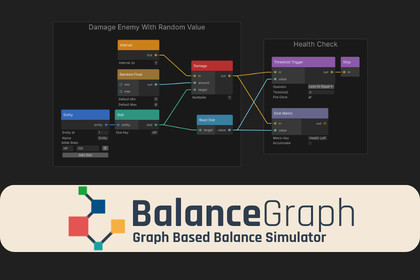
Node-based Unity editor to simulate & analyze game balance with Monte Carlo runs, metrics, validation, and CSV/JSON export.BalanceGraph is an Editor-only tool and does not depend on any Scriptable Render Pipeline features. It works the same with Built-in Render Pipeline, URP, and HDRP.Requirements:• Unity 2021.3 LTS or newer• Editor usage only (no runtime rendering/shaders/materials included)BalanceGraph is a node-based visual editor for Unity that lets game designers and developers model, simulate, and analyze game balance scenarios without writing code. Build simulation models by connecting nodes for entities, stats, attacks, intervals, and logic, then run Monte Carlo simulations to see statistical results (average, median, percentiles, min/max) for your mechanics.Workflow:• Install by copying the BalanceGraph folder into your project, then open it from Tools → BalanceGraph → Graph Editor.• Create a new graph asset, add nodes (Space / right-click), connect ports, and click Run.• Use Validate to catch common graph mistakes before simulating.For larger projects, BalanceGraph supports reusable “Custom Subgraph Nodes” (encapsulate a subgraph into one node with exposed inputs/outputs), batch comparison for side-by-side configuration testing, and exporting results as CSV or JSON for external analysis.Key features• Visual node editor (drag-and-drop), with color-coded categories and ports.• Monte Carlo simulation across hundreds/thousands of iterations for statistical distributions.• Results include averages, medians, percentiles (P10/P90), and min/max ranges.• Custom Subgraph Nodes: turn a subgraph into a reusable node with exposed ports.• Batch Comparison: run multiple configurations side-by-side and compare outputs.• Sensitivity Analysis: sweep parameters across a range to see impact.• Graph Validation: detects disconnected ports, missing entities/intervals, empty metric keys, duplicate entity IDs, etc.• Export: CSV and JSON export of the last run’s metrics.• Undo/Redo + grouping + templates for fast iteration.Editor / usability• Graph Editor layout: toolbar + canvas + sidebar (settings/results/batch comparison).• Simulation settings: Duration (seconds), Iterations, Seed (reproducibility), Collect All Stats.• Port types (color-coded): Trigger, Float, Bool, EntityRef, StatRef (only same-type ports connect).Requirements• Unity Editor: 2021.3 LTS or later• C#: 9.0• Platform: Editor-only (simulation)The core idea, architecture, and full implementation of this tool were developed entirely by me. I used an AI assistant (Claude Opus 4.6) only in a limited capacity for UI/front-end editor polish and small helper snippets in areas where I’m less specialized. Every AI-assisted suggestion was manually reviewed, rewritten where needed, and integrated by me to match my own coding standards and the intended behavior of the package.No AI was used to generate artwork, textures, models, audio, animations, marketing images, or any other creative assets. This package contains no generative-AI content and no third-party or copyrighted material sourced through AI.

