






Hierarchy Quick Actions PRO – Icons, Colors, Favorites & Lock
MAG Software
$7.69
$17.59
56%OFF
(no ratings)
Jump AssetStore
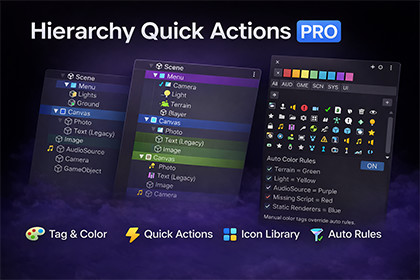
Speed up your Unity workflow by enhancing the Hierarchy with quick action buttons, colored tags, smart auto-rules and a powerful icon library.This tool is a Unity Editor extension and works in any Unity project regardless of render pipeline.Compatible with:• Built-in Render• URP• HDRPNo runtime code is included.No impact on builds or game performance.Works with:• any scene size & project• other hierarchy tools Tested with Unity:• 2021 LTS• 2022 LTS• Unity 6+No additional setup required.Install → open Unity → ready to use.🔥 Organize and control your Unity hierarchy instantly — without selecting GameObjects, opening inspectors or navigating menus. 🔥❌ Missing Scripts Detector – automatically marks GameObjects with broken references in red ❌👉 Toggle any feature on/off to keep the tool clean and simple — use only what you need.Hierarchy Quick Actions PRO adds fast-access buttons, color tags, icons and smart automation directly inside the Hierarchy, so you can:toggle objectslock selectionsmark favoritesapply colorsassign iconsrun actionsorganize large scenes…all in seconds, directly from the hierarchy view.No extra windows.No inspector hopping.No wasted time.Just faster scene management.Built for real production workflows, especially for:large sceneslevel designsimulation projectsteamsopen world projectsHierarchy Quick Actions PRO is a production-ready Unity Editor tool designed to make scene organization faster, clearer and safer.It adds visual hierarchy controls directly in the Unity Hierarchy window:color tags, icons, quick buttons and automation rules — all without breaking your workflow.Perfect for large projects, teams, level designers and technical artists.🎯 Core Features🎨 Tag & Color SystemApply colors to GameObjects in hierarchyImprove readability and scene structureWorks per object or recursively on children⚡ Quick Hierarchy ActionsDirect buttons in hierarchy for:Enable / DisableStaticLock selectionFavoriteRename helpersVisibility helpersCustom editor utilities🧠 Auto Color RulesAutomatically apply colors based on:Component typeObject typeMissing scriptsStatic renderersLights / Audio / Terrain etc.Manual tags override auto rules.🧩 Icon LibraryLarge built-in icon collectionApply per object or groupVisual identification at a glance🛠 Workflow FocusedNon-destructiveEditor-onlyLightweight & optimizedDesigned for large scenes💼 Use CasesLevel designScene managementTeam workflowsDebugging missing scriptsOrganizing large hierarchiesFast navigation in production scenes⭐ Why Hierarchy Quick Actions PRO?Because organizing large Unity hierarchies shouldn’t slow you down.Built from real production needs, this tool helps you move faster, stay organized and focus on building your game — not fighting the editor.Unity version: 2021.3+ (safe) / 2022 / 2023 / 6 Render pipeline: Built-in / URP / HDRP compatible Platform: Editor only Runtime impact: None Dependencies: None Code: C# Editor scripts Installation: Import package → Tools → MAG Tools → Hierarchy Quick ActionsAI tools were used only to generate marketing images, banners and promotional visuals for the Asset Store page.

