






VFX Preview – Visual + Overdraw + Draw Calls + Particle Count in One Inspector
eztoolslab
$10.99
$55.00
80%OFF
(no ratings)
Jump AssetStore
Always rejected for performance?
See your VFX and its draw calls, overdraw, and particle count at the same time — fix issues before you submit and ship with confidence.
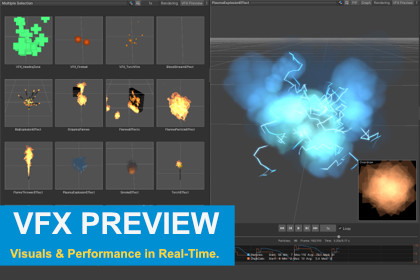
Zero setup. No Play Mode.Every VFX artist knows the drill: your effect looks stunning, then engineering rejects it for performance. VFX Preview fixes that in one click.Select a Prefab — the effect plays instantly in your Inspector with a live performance chart and overdraw heat-map. No Play Mode. No waiting.Who it is for- VFX Artists — stop guessing if your effect will pass review; see the numbers while you create- Technical Artists — find overdraw hotspots in seconds, not minutes- Programmers — debug VFX lifecycle frame by frame without test scripts- QA — verify that effects meet performance budgets at a glanceHow to use it1. Import the package2. Select a VFX Prefab3. Done — preview, performance chart, and overdraw appear automaticallyZero configuration. Zero runtime overhead.Compatible with Built-in, URP, and HDRP out of the box.VFX Graph support activates automatically when the package is installed.Core Features- Instant Inspector Preview — VFX plays automatically on Prefab selection; no Play Mode required- Real-Time Performance Chart — dual-axis graph tracks particle count and draw calls simultaneously, with Min / Max / Avg / Median statistics- Timeline Scrubbing — frame-accurate slider with step-backward and step-forward at 60 fps resolution- Playback Speed Control — 0.125x to 2x speed adjustment; supports slow-motion analysis- Overdraw Visualization — heat-map overlay highlights fill-rate hotspots; Picture-in-Picture (PiP) mode shows Rendering and Overdraw side by side- Multi-Selection Compare — select up to 25 VFX Prefabs and preview them simultaneously in a responsive grid layout- Interactive Preview Camera — rotate, pan, and zoom like Scene View; F key resets camera- Keyboard Shortcuts — Space (play/pause), Arrow keys (step frames), G (toggle graph), F (reset camera)Pipeline & Compatibility- Render Pipeline Auto-Detection — Built-in, URP supported out of the box- VFX Graph Support — automatically enabled when the Visual Effect Graph package is installed; supports playback and particle count tracking- ASE & Time-Based Shader Detection — detects Amplify Shader Editor materials and any shader using Unity built-in time variables (_Time, _SinTime, _CosTime); displays a warning when speed control may not affect shader-driven animationsAI tools assisted in the creation of code and images, which were subsequently refined manually.

