






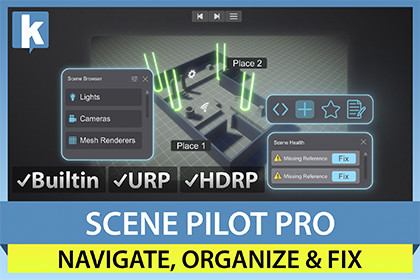
Find and fix scene issues fast. 60+ diagnostic checks (many with auto-fix), smart object browser, camera bookmarks, object notes, mini viewports.Scene Pilot Pro gives you instant diagnostics, fast navigation, and team documentation for any Unity scene. It runs entirely in the Editor - zero runtime components, zero build impact.❤️🩹 Health Scanner - Find and Fix Issues in SecondsStop shipping broken references, pipeline mismatches, and performance pitfalls. The Health window runs 60+ checks (and growing) across your objects, materials, meshes, and textures, then gives you a clear score from 0 to 100.- Auto-fix supported issues with one click, or batch-fix everything at once.- Checks cover missing components, shader errors, duplicate materials, raycast waste, texture memory, physics setup, LOD coverage, and dozens more.- Scene View overlay draws colored markers on flagged objects so you can spot problems visually- Export results to CSV, text or HTML for team review- Configurable thresholds and per-check disable for full control- Create your own checks with the included custom check template - no registration code needed.🔎 Browse Window - Navigate Any Scene InstantlyLarge scenes become manageable. The Browse window organizes every GameObject by component type, tag, layer, distance, or material.- Smart Focus: double-click any object and the camera flies to the best unoccluded viewpoint. Click again to cycle through alternatives.- Advanced Filtering: query by 30+ properties (vertex count, triangle count, bounds size, hierarchy depth, component type, material name, shader, and more) with AND/OR logic.- Custom Groups and Favorites: organize objects your way, per scene.- Smart Groups: save filter criteria as auto-updating groups.- 10 search modes: filter by name, component, material, shader, layer, tag, texture, mesh, static flags, or active state.- Multi-select with Ctrl+click and Shift+click, bulk visibility and pickability toggles.📝 Object Notes - Document Your Scenes Where It MattersLeave context right on the GameObjects. Notes are categorized (General, Gameplay, Art, Bug - or your own custom categories), color-coded, and prioritized.- Add notes from the Hierarchy right-click menu or the Notes window.- View as a sortable list or compact icon grid.- Open any note as a floating sticky in the Scene View.- Notes persist per scene in ProjectSettings - commit them to version control and share with your team.⛶ Places - Camera BookmarksSave up to 20 camera viewpoints per scene with thumbnail previews. Quick-access the first 9 with keyboard shortcuts:- Alt+Shift+1-9 to save, Alt+1-9 to recall.- Cycle through all bookmarks with the toolbar Back/Forward buttons.- Rename bookmarks for clarity ("Boss Arena", "Start Zone").- Grid or list view in the Places window.🖥️ Mini ViewportsMonitor your scene from multiple angles simultaneously. Up to 4 independent viewport windows, each with:- 7 preset angles (Top, Bottom, Front, Back, Left, Right, Free).- Orbit, pan, and zoom controls.- Pin to a selected object so the viewport follows it.- Perspective/Orthographic toggle, wireframe mode, edge snapping.- Layout presets for quick arrangement.📷 Screenshot ToolCapture the Scene View or Game View without entering Play mode.- PNG (lossless) or JPG (with quality slider).- Resolution: 50% to 200%, or custom pixel dimensions up to 8192px.- Timestamp or sequential filename suffix.- Optional countdown delay for setup time.🌐 Selection HistoryBack and Forward buttons in the main toolbar let you navigate through your object selection history, just like a browser. Stores up to 50 selections per session.📊 Scene Stats - Quantify Everything in Your SceneScene Stats tells you what your scene is actually made of. One window, refreshed on demand, with a six-section breakdown of every renderable, asset, and script in the active scene, and one-click export for reviews and build comparisons:- Geometry: GameObjects, renderers, submeshes, triangle and vertex totals, skinned-bone counts, static-batching candidates.- Memory: estimated texture VRAM, mesh runtime size, and audio runtime footprint, each with unique-asset counts.- Rendering: lights split by mode (Realtime / Baked / Mixed / ForcePixel) and by shadow-casting, cameras, reflection and light probes, unique materials and shaders, and total shader keywords to spot variant explosions.- Assets: textures grouped by resolution and format, prefab usage, plus a duplicate-named texture detector to surface accidental re-imports.- Scripts: total MonoBehaviours and how many implement Update / FixedUpdate / LateUpdate, ranked by instance count so you can see at a glance which type dominates per-frame cost.- Top Offenders: heaviest textures by VRAM, heaviest meshes by triangle count, most complex GameObjects by component count, most instanced prefabs. All entries are clickable to jump straight to the asset or scene object.- Export the full report as CSV, plain text, or HTML for code reviews, milestones, or comparing scenes across branches.Why Scene Pilot Pro?- Editor-only: no MonoBehaviours, no runtime scripts, no shader variants. Nothing touches your builds.- All pipelines: Built-in, URP, and HDRP with automatic detection.- Team-ready: notes, bookmarks, and health reports are stored in ProjectSettings for version control.- Extensible: create custom health checks that integrate automatically.- Lightweight: 8ms per-frame scan budget keeps the editor responsive even on large scenes.Related assets:- Scene Pilot Pro is included in the Health Studio Bundle.📖 Documentation | 💬 Support | 🎬 YouTube | 🏢 Publisher PageKronnect is dedicated to high-quality Unity assets with continuous updates and responsive support.Requirements:- Unity 6.0 or later- Built-in, URP, or HDRP render pipeline- All platforms (editor-only tool)

