






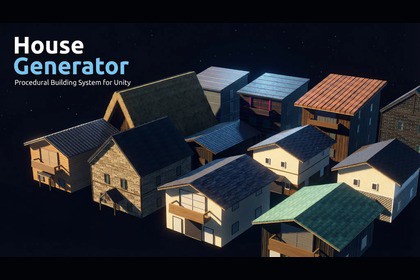
Unity Editor tool for procedurally generating buildings in 15 architectural styles. 1–10 floors, style presets, generation history, and range generation. No external dependencies.HouseGenerator is a Unity Editor tool that lets you generate customizable 3D building meshes directly in the Editor — no coding required.Select from 15 architectural styles (Near Future, Modern Wood, Medieval Stone, Japanese Modern, Gassho-Dzukuri, Edo Machiya, Kura-Zukuri, Showa Early, Showa Mid, Showa Late, and their variants), then configure floors, dimensions, roof type, windows, balconies, doors, timber framework, and noren curtains through a scrollable Inspector-style UI. Click "Place in Scene" and the mesh appears instantly — snapped to the Unity grid if you hold Shift.Each building uses 12 material slots with style-matched defaults auto-generated on first use. Per-floor material overrides let you vary wall, glass, frame, balcony, and sliding door materials independently on each floor.Save your favourite configurations as Style Presets and reload them at any time. Every placement is automatically saved to the History tab — restore parameters, re-place in the scene, or export to JSON. The Range tab lets you fill an area with randomised building variations in one click.For batch workflows, use the scripted API or JSON import to generate entire towns programmatically. All generation is Undo-able (Ctrl+Z).Ideal for rapid prototyping, game jams, and historical, Japanese, or fantasy game worlds.Features:- 15 architectural styles (Near Future, Modern Wood, Medieval Stone, Japanese Modern, Gassho-Dzukuri, Edo Machiya, Kura-Zukuri, Showa Early, Showa Mid, Showa Late + _2 variants)- 1–10 floor generation- 6 window types (Normal, Arch, Tall, Wide, Round, Slide Door)- Gable and Shed roof with adjustable pitch and eave overhang- Per-floor, per-face window count and type configuration- Per-floor balcony (Face, Depth, Railing Height)- Per-floor material overrides (Wall, Glass, Glass Frame, Balcony, Sliding Door)- Entrance door with optional canopy roof and support pillars- Timber framework (corner columns, floor-belt beams, gable decorative beams)- Noren (暖簾) curtain support- Style Presets — save/load named parameter+material sets as JSON- History tab — auto-logged placements with restore, re-place, and export- Range tab — multi-house generation with random variation across a defined area- SceneView click-to-place with grid snap (Shift)- Snap Pivot (Center / Corner) and Snap Offset X/Z for tile grid alignment- 12 material slots with style-matched auto-generated defaults- Scripted API and JSON batch import- Fully Undo-able (Ctrl+Z)- No external dependenciesSupported OS:- Windows- Mac- Linux

