





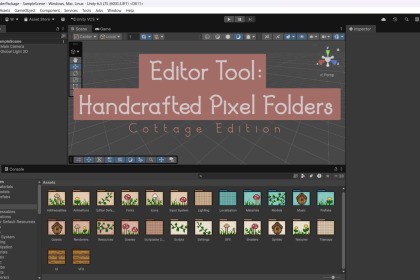
Handcrafted Pixel Folders - Cottage Edition
CrazyBirdLady
$0.0
$5.49
100%OFF
(no ratings)
Jump AssetStore
Give your project a visual boost with Handcrafted Pixel Folders-Cottage Edition, a lightweight Editor extension that adds cozy cottage‑core inspired folders. Stay organized, focused, and inspired!This tool is render-pipeline agnostic. It works entirely within the Unity Editor and is compatible with all SRPs (URP, HDRP, and Built-in) since it does not rely on runtime rendering features.Handcrafted Pixel Folders - Cottage Edition is a lightweight Unity Editor extension that helps you organize your project with charm and clarity.Easily assign cozy, pixel art icons to any folder in your Project window — no coding required.Whether you're building a 2D pixel game, prototyping a 3D world, or managing a large production, this tool improves visual clarity and makes navigating your project more fun and efficient.Features:26 handcrafted cottage‑core inspired folder iconsWorks in both grid view and list view in the Unity project windowLightweight and editor-only system that does not affect buildsAutomatically drawn over Unity’s default foldersEasy to extend with your own custom artworkIntegrates seamlessly with the free version of Handcrafted Pixel FoldersThis tool is suitable for all project types and genres, especially helpful for:Pixel art gamesLarge projects with many assetsTeams that want folder organization at a glanceNo render pipeline dependencies. Compatible with Unity 2020.3 and up.Key Features:26 handcrafted cottage‑core inspired folder iconsAdds context menu option: Set Custom Folder > CottageAdds reset folder menu option: Reset Folder To Default > ResetFully supports both grid view and list view in the Unity Project windowLightweight, Editor-only tool — has no impact on buildsCustom icons are drawn over Unity’s default folder iconsIncludes optional _list icons for fine-tuned list view alignmentSimple to extend with your own folder icons and labelsUses EditorPrefs to store folder color settingsWorks out of the box with no extra setupIntegrates seamlessly with the free version of Handcrafted Pixel FoldersThis tool was developed collaboratively using ChatGPT as a coding assistant and Grok for concept art and feedback. AI was used to help generate and refine C# editor scripts, improve naming conventions, troubleshoot errors, and polish documentation. All assets and code were reviewed, tested, and customized manually to ensure quality and usability.

