






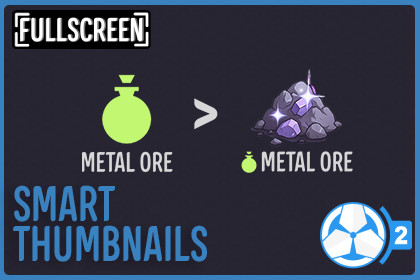
Smart Thumbnails shows the actual sprite of Game Creator 2 assets as their Unity thumbnail, making items, weapons, quests, and stats instantly recognizable without opening them.Smart Thumbnails for Game Creator 2Smart Thumbnails makes working with Game Creator 2 assets much faster and easier by showing the actual sprite of your assets as their thumbnail.Instead of seeing the default ScriptableObject icon everywhere, Smart Thumbnails displays the sprite already assigned inside the asset. Your items, weapons, quests, and stats instantly become recognizable directly from their thumbnails.No more opening assets just to see what they are.No more guessing based on names.You can immediately identify everything visually.This small quality of life improvement makes organizing and selecting assets dramatically faster.Why Smart Thumbnails?Game Creator 2 assets already include a sprite that visually represents them. However, Unity still displays their generic ScriptableObject icon in places like:The Project windowObject pickers used in instructionsThis means you constantly have to read names or open assets to confirm what they are.Smart Thumbnails automatically replaces those icons with the sprite already defined in the asset.You instantly see what each asset represents, which speeds up your workflow and makes your project easier to manage.Supported Game Creator 2 AssetsSmart Thumbnails automatically detects and displays sprites for the following Game Creator 2 ScriptableObjects:InventoryItemQuestsQuestShooterShooter WeaponAmmoReloadMeleeMelee WeaponSkillStatsAttributeClassStatStatus EffectIf the asset has a sprite assigned, Smart Thumbnails will display it automatically.Works in Project Window and Object PickersSmart Thumbnails improves asset visibility in places where you select assets during development, including:The Unity Project WindowObject windowFor example when selecting assets in instructions like:Add ItemTrack QuestEquip Shooter WeaponApply Status EffectInstead of identical ScriptableObject icons, you will see the actual sprite assigned to the asset.This makes browsing and selecting assets much faster.One Click SetupSmart Thumbnails includes a one click setup button when you import the asset.Click the setup button once and Smart Thumbnails will automatically configure everything needed for the editor integration.After that, it works automatically.No extra setup. No workflow changes.Useful for Any Project SizeSmart Thumbnails is helpful for small, medium, and large projects.Even a small project becomes easier to navigate when assets are visual.In larger projects with many items, weapons, quests, or stats, visual thumbnails make a huge difference when browsing folders or selecting assets.You can quickly scan your project and find what you need without reading through long lists of names.Using Editor Pro?If you're using Editor Pro for Game Creator 2, Smart Thumbnails works perfectly alongside it.Editor Pro makes creating and editing Game Creator 2 assets faster, while Smart Thumbnails makes them easier to recognize and browse visually.Together they create a smooth workflow where you can quickly create assets and instantly identify them through their thumbnails.➡ Check out Editor Pro for Game Creator 2🔗 Links🌐 Website📖 Documentation📚 Setup Guide💬 DiscordRequires Game Creator 2Requires at least one of the following Game Creator 2 module:Supported Game Creator 2 ModulesInventoryQuestsShooterMeleeStats.

