






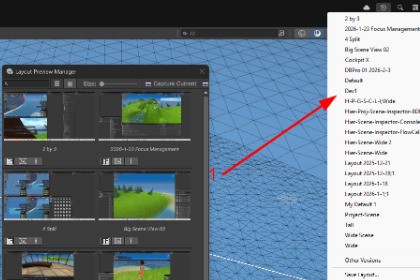
See your editor layouts before switching. Captures screenshots of each layout and shows thumbnail previews in a visual grid. Hover to see full-size preview. Never guess which layout is which again.Layout Preview Manager adds a visual preview window for Unity Editor layouts. Instead of blindly picking from a text list, you can see exactly what each layout looks like before loading it.FeaturesVisual grid of all saved layouts with thumbnail previewsHover over any thumbnail to see a full-size previewCapture Current: screenshot the active layout with one clickCapture All: batch capture every layout automatically with progress bar and cancel supportSave layouts with automatic preview captureSearch and filter layouts by nameGrid and list view modes with adjustable thumbnail sizeDouble-click or button to load any layout instantlyFloating utility window, does not dock into your editorRight-click menu: open file location, delete layout, delete previewAuto-capture on layout changePreviews stored in Library folder, excluded from builds and version controlSingle script, no dependenciesHow to UseOpen from Tools > Fables Alive Games > Layout Preview Manager or press Ctrl+Shift+L. Click Capture All to generate previews for all your layouts. After that, browse and switch layouts visually.CompatibilityUnity 6.x LTS. Uses Assembly Definition for clean compilation. Editor only, zero runtime impact.

