






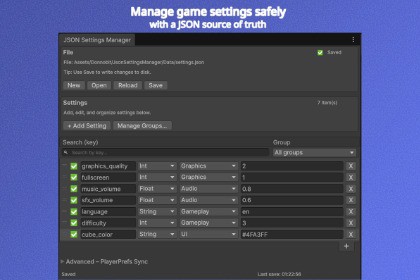
Manage Unity settings using a human-readable JSON file as the single source of truth. Includes an Editor window, drag & drop ordering, and a minimal runtime API with demo.JSON Settings Manager is a lightweight and reliable Unity tool for managing game and application settings using a human-readable JSON file as the single source of truth.It provides a clean, source-control friendly workflow where settings can be tracked, diffed and reviewed like regular code.Editor featuresDedicated Editor window to create and manage JSON settings filesKey search filterFlexible settings grouping system with group filteringSafe add, edit and delete operations with validationDrag & drop reorderingClear saved / unsaved state indicatorsSafe save and reload guards to prevent accidental data lossOptional PlayerPrefs synchronization (Editor-only, advanced feature)Runtime featuresMinimal, dependency-free API for loading, reading, writing and saving settingsBuild-safe persistence using Application.persistentDataPathOptional runtime converters (example included)Fully compatible with builds and all platformsDemoAn included demo scene shows a practical runtime example:a cube whose color is stored in JSON and persisted across play sessions, with support for restoring default values.• JSON-based settings management with dedicated IMGUI Editor window• Human-readable JSON file used as single source of truth• Built-in key search filter• Settings grouping system with group filtering (All / Ungrouped / Missing / Specific group)• Missing group detection and safe handling• Safe add, edit, delete and reorder operations with validation• Clear saved / unsaved state indicators• Atomic save with backup (.bak) protection against data loss• Optional PlayerPrefs sync (Editor-only)• Lightweight runtime API for loading, reading, writing and saving settings• Runtime persistence using Application.persistentDataPath• Version-control friendly (diffable JSON format)• Demo scene included showing real runtime usage• No external dependencies• Compatible with Built-in, URP and HDRP

