






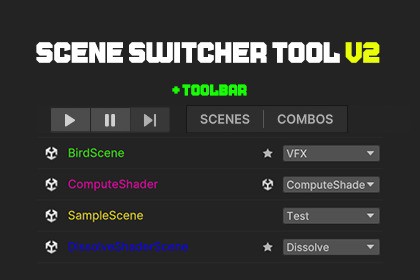
Boost workflow with instant scene switching, bookmarks, search, and toolbar shortcuts.Supports Unity 2022.3 LTS and Unity 6 (6000.0+)The Scene Switcher Tool is a lightweight but powerful Unity Editor extension that makes navigating scenes fast, simple, and efficient. Instead of searching through project folders or reopening the Build Settings panel, developers can instantly switch scenes, bookmark favorites, and access everything from a clean UI or a convenient toolbar shortcut.Supported OS: Windows, Mac...Unity Versions: 2022.3 LTS, 6000.0+Features:- Bookmark your favorite scenes- Quickly open scenes from a searchable list- Toolbar dropdown for quick access- Drag & drop scenes into the bookmark list- Additive load support- Scene pinging in Project window- Auto-layout for editor window- Bookmark save persistenceTag Manager- Assign tag to the scene- Manage the scene by Tag- Set Tag ColorToolbar Button:If enabled in settings, a button appears next to the Play Mode controls.Click it to quickly switch scenes or add the current scene to bookmarks.Main Window Overview:- Search Bar: Filter scene names in real time.- Mode Selector: Bookmarks or Scenes In Build.- Scene List: Click to select, double‑click to open.- Action Buttons:* Load (Single) – Opens selected scene* Additive Load – Opens scene additively* Ping – Highlights scene in Project* Add Current Scene – Bookmark current scene* Remove Selected / Remove All – Manage bookmarks* Settings – Adjust layout and behavior* Credits – Shows contributorsPlugins:Scene Combo :- Create a list of scenes.- Load ComboI used AI/ML to help me write the Document and Description of this package because of my English skill.

