






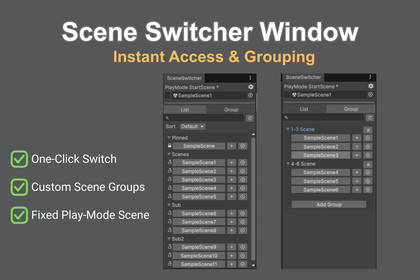
Scene Switcher Window is a powerful editor extension designed to make scene switches in Unity as smooth as possible.~ One-Click Instant Access to Every Scene in Your Project ~"Where did I put that scene file?"Searching through deep folder hierarchies in the Project window wastes precious seconds—and those seconds add up, breaking your creative flow.Scene Switcher Window is a powerful editor extension designed to make scene switches in Unity as smooth as possible. With its intuitive list view and robust grouping features, it eliminates the stress of scene management once and for all.Are you struggling with these common issues?Time Wasted Searching: Having to navigate folders or search the Project View every time you need to switch scenes.Complex Multi-Scene Workflows: The tedious process of manually adding (Additive) multiple scenes one by one.Play Mode Inconvenience: Having to manually switch back to the "Title" or "Bootstrap" scene every time you want to test your game from the start.Key Features:1. One-Click Scene AccessLists all scenes in your project for instant access. Open a scene or "Load Additive" with a single click. You can also "Pin" frequently used scenes to the top of the list for immediate access.2. Custom GroupingOrganize related scenes into custom groups. You can load all scenes within a group simultaneously—a game-changer for projects utilizing multi-scene architectures.3. Fixed Play Mode Start SceneNo matter which scene you are currently editing, pressing the Play button will always start from your designated scene (e.g., Title or Loader). Stop wasting time switching scenes just to hit "Play."4. Advanced Filtering & OrganizationDirectory Foldout: Automatically groups the list by the scene files' parent directory names for better visibility (Toggleable in settings).Search & Sort: Easily find scenes by name or sort them by "Recently Used" to keep your current tasks at the forefront.Specific Directory Filtering: Configure the tool to only display scenes from specific folders, keeping the list clean and relevant.Support & DocumentationHow to use: Simply go to Window > TKGizmoLab > Scene Switcher to get started.Detailed Guide: A comprehensive manual is included in the package as Readme.pdf.Boost your workflow today. Turn those wasted seconds of scene switching into minutes of pure creativity.Supported Unity Version: 6000.0.64+ or higherGroups and Options are saved in ScriptableObjects.Window states are saved in EditorPrefs.

