






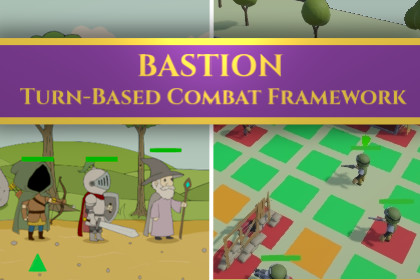
BASTION Turn-Based Combat Framework
Polyburg Studio
$20.90
$48.40
57%OFF
(no ratings)
Jump AssetStore
STOP REINVENTING THE WHEEL! Building a turn-based combat engine from scratch takes months. BASTION saves you 100+ hours of coding by providing a production-ready, highly modular backend architecture.Whether you're making a tactical grid RPG or a squad-based strategy game – BASTION handles the logic, so you can focus on game design.COMBAT SYSTEM• Comprehensive Status System: Stackable DOTs (Bleed, Poison), CC (Stun, Silence), and Riposte/Counter-attack mechanics• Ability Framework: Modular skills for single-target, AOE, and resource management (Action Points, Mana, Stamina)• Guard & Protection: Guardian system with damage reduction and redirect mechanics• Melee Engagement System: Tactical ranged weapon restrictions when enemies are adjacent (Warhammer 40K style)FORMATION & POSITIONING• Rank-Based Formations: 4-slot system with position-locked abilities and auto-advance (Darkest Dungeon style)• Formation Swaps: Dynamic rank position swapping with optional resource costs• Visual Rank Placement: Transform-based positioning for custom formation layoutsTACTICAL FEATURES• Automatic unit responses to combat events (Ripostes, healing triggers, buff refresh)• Targeting Preview: Live visual feedback for AOE/Cone/Line/Single-target abilities with hit markers• Zone of Control (ZoC): Opportunity attacks when enemies moveAI & BEHAVIOR• 7 AI Modules: Ready-to-use behaviors (BestAbility, AttackNearest, AttackWeakest, HealAllies, BuffAllies, DebuffEnemies, RetreatOnLowHP)• AI Presets: Configurable via ScriptableObject—Aggressive, Healer, Support, Tactical Controller• Difficulty Scaling: Easy (0.85x) → Normal (1.0x) → Hard (1.15x) priority weightingMOVEMENT SYSTEMS• Grid Movement: Classic tile-based with obstacle detection🛠️ TECHNICAL WORKFLOWDESIGNER-FRIENDLY• ScriptableObject Driven: Handle balancing and design entirely within the Inspector—no coding required• Visual Targeting System: Live preview of ability impact zones before casting• Formation Templates: Pre-configured 4-rank formations for quick setupDEVELOPER-FRIENDLY• Event-Bus Architecture: Seamlessly trigger VFX, SFX, and UI updates using pre-defined event hooks• Clean Code: Modular C# architecture, interface-based, optimized for performance (Low GC allocation)• Extension Points: ITargetingStrategy, IAbilityValidator, IAIModule for custom behaviors• AI-Coding Friendly: Works seamlessly with GitHub Copilot for rapid prototyping📦 WHAT'S INCLUDEDSCENES & EXAMPLES• Starter Scene: Minimal setup for quick prototyping• Grid Demo Scene: Grid-based combat showcase tactical positioning• Full Demo "Brightest Dungeon": Hand-drawn character showcase with all featuresCONTENT• 7 AI Presets (Aggressive, Healer, Support, Tactical, and variants)• Status Effect Library: Bleed, Poison, Stun, Silence, and custom templates• Ability Templates: Attack, Heal, Buff, Debuff, Utility• Formation Presets: Ready-to-use 4-rank setupsDOCUMENTATION• Complete User Manual (v1.1)- Formation System & Swaps- Squad Grid Scene setup- Zone of Reaction mechanics- Targeting Preview configuration- Melee Engagement System- AI Preset creation & tuning- Troubleshooting & optimization guidesTOOLS• Inspector-based AI Editor: Visual module management• Status Effect Tracker: Real-time status monitoring• Combat Log: Built-in event logging for debugging🎯 PERFECT FOR✓ Tactical RPGs (Darkest Dungeon, Divinity: Original Sin style)✓ Squad-based Combat (XCOM, Warhammer 40K Mechanicus style)✓ Turn-based Strategies (Fire Emblem, King's Bounty)✓ Educational Projects learning combat system design💡 HIGHLIGHTSZero Setup Required - Drag-and-drop into a Unity project and start prototypingDesigner Paradise - Adjust difficulty, AI behavior, and combat balance without touching codePerformance Optimized - Low garbage allocation, efficient pathfinding, optimized event systemExtensible - Add custom abilities, status effects, and AI modules with clean interfacesWell-Documented - API reference, setup guides, and troubleshooting for every system🎮 PLAYABLE WEB DEMO ON ITCH.IOExperience the framework in action before purchasing. Try the Brightest Dungeon demo and see how the systems work together.🚀 GETTING STARTEDImport into Unity (Best Practice is to start with 2D URP Scene)(⚠️ You may see console warnings about PSD Layer IDs or "inconsistent import result" during import. These are cosmetic warnings from Unity's 2D PSD Importer and can be safely ignored.)Open Brightest Dungeon Scene to see everything in action(⚠️ If the demo scene appears pink/empty: assign a URP Renderer Asset under Edit → Project Settings → Graphics (or Quality, depending on Unity version). This is standard URP project setup and not an asset issue.)Read the included DOCUMENTATION.mdDuplicate a preset & modify settings in the InspectorExtend via interfaces (IAIModule, IAbilityValidator, ITargetingStrategy)Characters are ai-inspired, but hand-drawn!

