






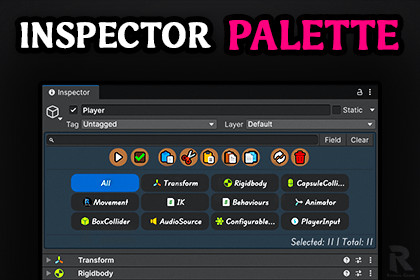
Inspector Palette | A Better Way to Manage & Edit Components
Ramdal Games Studios
$32.99
$49.50
33%OFF
(no ratings)
Jump AssetStore
Select, filter, and bulk-edit components with precision. Instantly find specific components or fields, focus only on what you need, and take full control, leveling up your workflow and saving time.Tested and guaranteed to work from Unity 2021.3 LTS up to the Latest Unity Supported Version.Compatible with all three render pipelines.Zero build performance impact.Ramdal Inspector Palette is a fully customizable Unity Editor extension that streamlines component management in the Inspector. It lets you quickly select, filter, and bulk-edit components while instantly finding specific components or fields.Key features include:Palette: View, Select and manage all components on a GameObject with precision.Toolbar: Perform bulk actions like copy, paste, duplicate, delete, reset, expand/collapse, and enable/disable, fully customizable to your workflow.Search Bar: Quickly locate components or fields, with customizable styling and search modes.Drag & Drop: Copy, move, or create new GameObjects with selected components, modify behavior via shortcuts.Shortcuts: Streamline actions with fully customizable keyboard shortcuts for maximum efficiency.Status Bar: Track total and selected components at a glance, with full customization.Backup & Restore: Save and restore configuration presets, making it easy to manage different workflows.Full Control & Customization: Everything is modular and fully adjustable to suit your needs, letting you tailor the tool entirely to your workflow.Full Undo / Redo Support: Every action is fully integrated with Unity’s undo system, allowing safe experimentation and quick recovery.Smart Dependency Awareness: Automatically sorts components by dependency during actions, preventing component dependency conflicts and ensuring your setup never breaks.Full Compatibility: Works seamlessly with other Inspector extensions and tools (such as Better Transform) while preserving all custom property drawers and editor integrations.Whether you’re managing a few components or a complex GameObject hierarchy, Ramdal Inspector Palette saves time, reduces clutter, and gives you complete control over your Unity Inspector workflow. Fully customizable, adaptable to any project, and designed to boost productivity for developers of all levels.DISCORD | DOCUMENTATIONPalette: Browse, select, and manage all components on a GameObject.Toolbar: Bulk operations including copy, paste, duplicate, delete, reset, expand/collapse, enable/disable, fully customizable layout, size, colors, and buttons.Search Bar: Find specific components or fields, customizable styling and search modes, can be enabled or disabled.Drag & Drop: Copy, move, or create new GameObjects from selected components, behavior modifiable via shortcuts.Shortcuts: Fully customizable keyboard shortcuts for all actions including copy, paste, duplicate, delete, reset, and drag/drop.Status Bar: Displays total components and selected components, fully customizable.Backup & Restore: Save and restore configuration presets, switch between multiple setups easily.Full Control & Customization: Modular design allowing full adjustment of all UI elements, workflows, and behaviors.Full Undo / Redo Support: Every action is fully integrated with Unity’s undo system, allowing safe experimentation and quick recovery.Smart Dependency Awareness: Automatically sorts components by dependency during actions, preventing component dependency conflicts and ensuring your setup never breaks.Compatibility: Works seamlessly with other Inspector extensions and tools (such as Better Transform and more) while preserving all custom property drawers and editor integrations. Designed for the Unity Editor, supports any GameObject hierarchy and complex component setups, with no impact on game performance since it only runs when interacting with the Inspector.

