






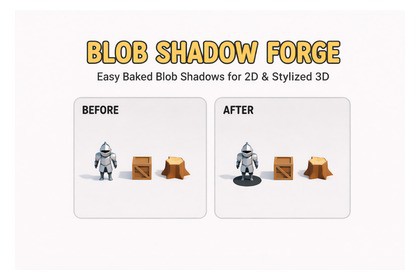
Transform your Unity projects with beautiful blob shadows! This powerful editor tool lets you bake high-quality shadow textures from any 3D object with just a few clicks.🎨 **Blob Shadow Forge** - Professional Unity Editor Tool for Baking Stylized ShadowsTransform your Unity projects with beautiful blob shadows! This powerful editor tool lets you bake high-quality shadow textures from any 3D object with just a few clicks. Perfect for 2D games, stylized projects, UI elements, and artistic workflows.---## ✨ Key Features**🎯 One-Click Shadow Baking**- Generate blob shadows from any 3D object instantly- Batch processing with queue management and progress tracking- Auto-size camera to perfectly fit object bounds- Smart bounds calculation (pivot or bounds center)**📷 Advanced Camera Controls**- Multiple presets: Top, Bottom, Front, Back, Left, Right, Custom- Light source integration (Directional/Spot lights)- Custom rotation and position offset controls- Real-time preview with diagnostic information**🌫️ Professional Shadow Effects**- Customizable blur (intensity 0-2, iterations 8-128) for soft shadows- Distance-based fade runtime component- Surface snapping with automatic normal alignment- Smart raycasting from mesh bounds**⚡ Workflow Tools**- Preset system with default presets included- Shadow atlas generator (Grid or Tight packing)- Custom naming patterns with placeholders- Texture sizes: 64 to 2048 pixels- Auto sprite creation**🎮 Runtime Components**- **ShadowDistanceFade** - Dynamic opacity based on distance to ground, surface snapping, normal alignment- **ShadowAtlasUser** - Use specific shadows from atlas with automatic UV mapping- **ShadowAtlasData** - ScriptableObject for atlas UV coordinates---## 🎯 Perfect For✅ 2D games with 3D assets✅ Stylized and artistic projects✅ Isometric and top-down games✅ Any project needing stylized shadows---## 🚀 Quick Start1. Open Window menu → Blob Shadow Forge2. Select your target object3. Adjust settings (or use presets)4. Preview in real-time5. Click "Bake Shadow"For batch processing: Switch to Batch mode, add objects to queue, configure once, process all automatically!---- **Unity Version**: 2020.3 or later- **Render Pipeline**: Built-in RP or Universal RP- **Platform**: Windows, Mac, Linux (Editor only)**Included:**- Complete Editor tool with modern UI- Runtime components for dynamic shadows- Custom shaders (Built-in RP and URP)- Blur shader for soft shadows- Preset system with default presets- Shadow atlas generator- Example models and demo scene---## 💡 Best Practices- Use auto-size camera for consistent sizing- Enable surface snapping for terrain-following shadows- Use batch processing for large projects- Generate shadow atlases to optimize textures- Adjust blur based on your art styleI mainly used Cursor to accelerate my production time

