






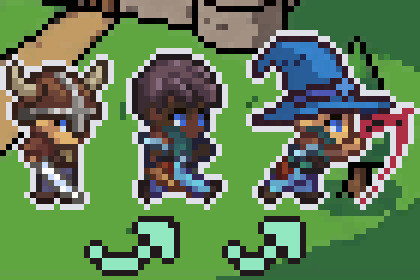
Create 2D characters with swappable equipment and synced animations from one Aseprite file. Like Terraria & Stardew Valley. No Unity Animator, no messy sprite sheets - fully automated and organized.The Ultimate 2D Modular & Customisable Animation SystemBring your characters to life with swappable equipment and perfectly synced animations — built for indie developers, by an indie developer.One file - manage all parts, layers, and animations in a single Aseprite fileAuto-synced - every body part stays perfectly in sync, alwaysBeginner friendly - video guides, clean code, and easy-to-read documentation includedNo Animator - no Animator component, no Coroutines, no headachesOne Aseprite file - One Click Export- Draw layers for each body part (Skin, Weapon, Armor, etc.)- Tag animations directly in Aseprite (Idle, Walk, Attack, etc.)- Export everything in one click via Tools → Animation System → ExportAseprite is recommended but not required — any sprite export tool works as long as the exported sprites follow the naming conventions outlined in the documentation.Equipment swapping- Swap weapons, armor, and gear instantly on input- Animations update automatically on swap- Uses Scriptable Objects for items data- Easy to understand sub-systems for customisationState-based animation- Movement, combat, and direction states built-in- Call SetNewState() to trigger any animation- Animations can auto-return to idle when finishedEvent-driven integration- Subscribe to OnStateChanged to hook into any external system- Sound, VFX, and UI examples included- Clean event pattern with zero couplingExample scene included- Fully set up player controller out of the box- TopDown and SideScroller movement modes- Combat, health, and sound controller examples- Placeholder animations ready to goFull documentation- Quick start guide available- Video tutorial walkthrough- API reference and troubleshooting tipsVersion: 1.0.0 (February 2026)Unity Version: 2022.3+ recommendedPlatform: All platformsDependencies: TextMeshPro, Unity 2D Sprite PackagePackage Contents:- 15 C# scripts (Minibit namespace, fully commented)- Example scene with working demo- Prefabs: GameManager, Entity- Documentation + 3-minute video tutorialCore Components:- Animation system (Controller, Player, Loader)- State management (EntityState, Enums)- Item/Equiptment system (ItemData ScriptableObjects, Loader, Slots)- Example scripts (Player controller, Health, Sound)- Aseprite export toolRequirements:- Unity 2022.3+ or 2021 LTS- Old Input System enabled (supports New Input System too)- Aseprite installed (highly recommended, not required)Support:Website: www.minibitgames.comEmail: support@minibitgames.comDocumentation: https://www.minibitgames.com/unity-2d-animation-system-documentationNo AI-generated code or assets. AI was used only as a conversational assistant for code review, documentation proofreading, commenting, and listing copywriting. All code and architecture are 100% human-created.

