






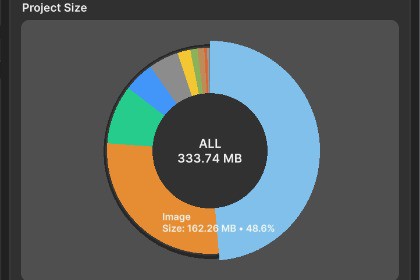
Analyze your Unity project’s Assets folder by size and file type (Project Size / Build Size / Unused), visualize with charts, and export results to CSV.Assets Folder Analyzer is a Unity Editor tool that scans your project’s Assets directory and generates a clear size breakdown so you can quickly identify what’s taking the most space—textures, models, scenes, audio, and more.It provides:Folder tree view with per-folder size totalsType breakdown chart to instantly spot the biggest contributorsUnused Size (assets not referenced in scenes/prefabs/materials — best-effort analysis)Multiple metrics:Project Size (disk usage in your project)Build Size (estimated contribution to builds, based on import/compression where possible)CSV Export for reporting and optimization trackingPerfect for:Reducing project bloat before handing off to clientsOptimizing build sizes for mobile/VRFinding accidental duplicates and heavy art packsKeeping teams accountable with size reportsKey Features✅ One-click Scan✅ Folder tree with size + file count✅ Breakdown by asset type (Image, 3D, Scene, etc.)✅ Donut/Pie chart visualization✅ Toggle metrics: Project Size / Build Size / Unused Size✅ Export CSV (share with producers/artists)✅ Works with large projects (optimized scanning flow)✅ Editor-only (safe to include in any project)

