






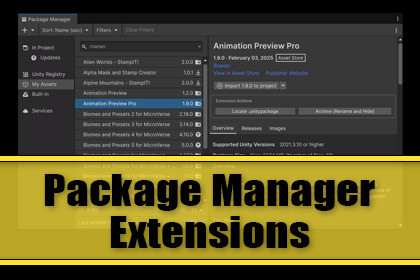
Adds action buttons to Unity's Package Manager, e. g. to locate packages on disk, to archive .unitypackage files before you overwrite them with an update or to create your own actions via API.OverviewPackage Manager Extensions adds a compact action panel to the Package Manager detail view. It works across various tabs, most notably the "My Assets" tab. You can conveniently locate the downloaded unitypackage files or archive them at the click of a button before you download an update from the Unity Asset Store.Free vs Support the Dev EditionThe Free and the Support the Dev Edition are identical. I just enjoy coding and creating tools and provide my workflow for the awesome Unity Community. The Support the Dev Edition is available in case you find the asset useful for your workflow and you would like to support the developer and future development.EditionsPackage Manager Extensions - FREEPackage Manager Extensions - Support the Dev EditionDesign IntentWhen you download an update of an asset from the Unity Asset Store it's always recommended to create a backup of your existing asset, just in order to be able to revert back in case something fails with the update.Unity's Package Manager doesn't provide a means to backup files before you download them. You have to do it manually by searching for the folder and the unitypackage file. It's not even possible to just rename the file, the Package Manager would just find and overwrite the renamed file.This extension allows you to locate the file at the click of a button and in addition rename the file in a way that Package Manager won't overwrite it.Built-in ActionsLocate on Disk: Opens the file browser with the location of the selected package. For Asset Store packages it locates the .unitypackage file. For UPM packages it locates the resolved folder. Hover the button for the full path visualized in a tooltip.Archive (Rename and Hide): Rename a downloaded .unitypackage by appending a timestamp and .archive extension. Unity stops seeing the file, so it disappears from My Assets, but without deleting the file. A confirmation dialog shows you exactly what will happen before you proceed. To restore, rename the file back.Editor PreferencesThe extension including additional features can be toggled on and off via editor preferences.ExtensibilityAdd your own actions by implementing the interface. No registration, no configuration changes required, the extension discovers new actions automatically at editor startup. You can use the provided extensions as an example.CompatibilityUnity's Package Manager's API is sealed and locked and can't be directly accessed. This asset uses reflection in order to get the required data. In addition it injects the UI buttons into the Package Manager panel. Compatibility depends on the backwards compatibility of Unity.This asset uses reflection in order to get data from the Unity Package Manager. It provides an API so that you can add additional actions at your own convenience. Compatibility depends on the backwards compatibility of Unity.

