






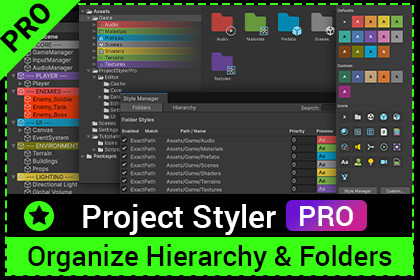
Visual tool to organize Project folders and Hierarchy using colors, text styles, and icons. Keep your Unity projects clean, readable, and easy to navigate.Project Styler PROVisual organization for Project & HierarchyProject Styler PRO is a Unity Editor tool that helps you keep your projects clean, readable, and easy to navigate.It allows you to visually organize folders in the Project window and GameObjects in the Hierarchy using colors, text styling, and icons — all without writing a single line of code.Perfect for small prototypes and large production projects alike.Key FeaturesProject Window StylingCustomize folder background colorChange text colorAssign custom icons to foldersApply styles instantly or via detailed rulesSupports exact folder paths or folder name matchingHierarchy StylingStyle GameObjects with background and text colorsAutomatically apply styles using name-based rulesGameplay logicIdeal for grouping systems like:UILightingEnemiesEnvironmentQuick Style PaletteAlt + Click on folders or GameObjects to open a quick style paletteOption (⌥) + Click on macOSChoose from predefined colors or create custom styles instantlyStyle ManagerCentral place to manage all stylesEnable or disable styles at any timeEdit existing stylesControl style prioritySeparate tabs for Project and Hierarchy stylesSettingsEnable or disable the entire systemToggle Project window styling independentlyToggle Hierarchy styling independently(Settings are stored per editor instance)Reset settings to defaultsWhy Use Project Styler PRO?Improve project readability at a glanceNavigate large projects fasterReduce time spent searching for assets and objectsKeep consistent visual structure across your projectNo scripts, no setup, no runtime impactThis tool works entirely inside the Unity Editor and does not affect your build.How It WorksImport the assetHold Alt and click on a folder or GameObjectChoose a styleEnjoy a cleaner, more organized project_____________________________________What’s included in Project Styler LiteFolder colors in Project (background & text)Hierarchy object colorsInstant styling via Alt + ClickStyle rules: Exact Path, Folder Name, Name ContainsStyle priority systemCentralized Style ManagerOne-click enable / disableWhat you get with Project Styler ProEverything in Lite, plus:Custom folder icons (Texture2D)Ignore Case matchingSeparate toggles for Project and Hierarchy stylingReset to DefaultsAccess to the Style Database (advanced control)Extended settings for full styling control

