






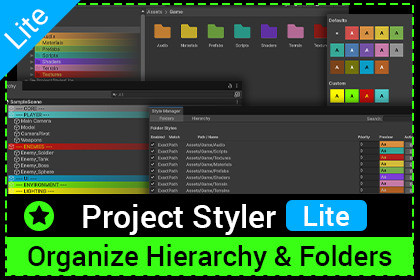
Quickly organize your Unity project with Project Styler Light. Apply color styles to folders and hierarchy items using simple Alt-Click workflows. Lightweight and easy to use.Project Styler Lite is a lightweight Unity editor tool that helps you visually organize your project faster and more clearly.It lets you style folders in the Project window and GameObjects in the Hierarchy using colors — directly inside the editor, without writing any code.Project Styler Lite focuses on simplicity, speed, and performance.Ideal for developers who want cleaner projects without complex configuration.Key FeaturesColor styling for folders in the Project windowColor styling for GameObjects in the HierarchyFast workflow using Alt / Option + ClickFolder background and text color customizationHierarchy background and text color customizationComponent Type NameMultiple matching modes:Name ContainsExact NameTagLayerCentralized Style Manager for all stylesAutomatic fade effect for better readabilityMinimal settings with a single enable/disable toggleHow It Works(Option + Click on macOS)Hold Alt and click on a folder or GameObjectChoose a color from the quick paletteOr open Custom to define matching rules and priorityStyles are applied instantly and update automaticallyStyle ManagerThe Style Manager lets you:View all created stylesEnable or disable individual stylesEdit colors and matching rulesAdjust prioritiesSwitch between Project and Hierarchy styles_____________________________________What’s included in Project Styler LiteFolder colors in Project (background & text)Hierarchy object colorsInstant styling via Alt + ClickStyle rules: Exact Path, Folder Name, Name ContainsStyle priority systemCentralized Style ManagerOne-click enable / disableWhat you get with Project Styler ProEverything in Lite, plus:Custom folder icons (Texture2D)Ignore Case matchingSeparate toggles for Project and Hierarchy stylingReset to DefaultsAccess to the Style Database (advanced control)Extended settings for full styling control

