






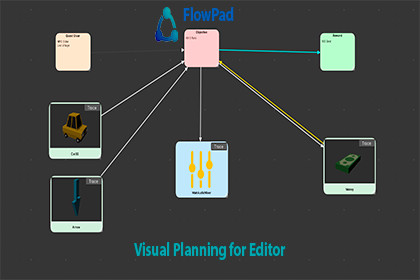
Visual planning tool for your Editor. Create flowcharts, task boards, and UI maps. Drag-and-drop assets. Beautiful, fast, built for game developers.FlowPad - Visual Planning for UnityFlowPad transforms chaotic planning into an enjoyable visual experience. With its clean pastel interface, smooth animations, and polished micro-interactions, organizing complex game systems becomes intuitive and even fun.What makes FlowPad different:🎯 Built specifically for Unity – Not a generic tool adapted for game dev💎 Beautiful by default – Professional design without configuration⚡ Instant workflow – Drag assets, create connections, done🚀 Zero learning curve – Intuitive controls that feel natural🔧 Deeply integrated – Works seamlessly with your Unity project🌟 Core Features That Save You HoursUnlimited Visual BoardsCreate separate boards for every system, level, feature, or sprint. Switch between them instantly. No limits, no subscriptions, no cloud dependencies.6 Professional TemplatesStart fast with pre-built layouts:• Quest Flow – Design narrative branches and objectives• UI Flow – Map screen transitions and user journeys• Kanban Board – Manage tasks with To Do / In Progress / Done columns• Mind Map – Brainstorm ideas with radial layouts• Dialogue Tree – Structure conversations and choices• Database Schema – Visualize data relationshipsDrag & Drop Unity AssetsThis is the killer feature. Drag prefabs, scripts, textures, scenes—anything—from your Project window onto the board. FlowPad creates beautiful nodes with previews automatically. Perfect for:• Visualizing asset dependencies• Planning prefab relationships• Documenting scene flows• Organizing sprite collections• Mapping script architecture📚 Complete Documentation Included✅ User Manual – Comprehensive 300+ line guide✅ Quick Start Guide – Get productive in 5 minutes✅ Keyboard Shortcuts Reference – Complete table✅ Example Boards – 6 sample boards demonstrating use cases📞 SUPPORTActive Discord Community: Join our developer community to get help, share ideas, and connect with other usersDirect link: discord.gg/kinagames Average response time: Under 24 hoursEmail Support: For private inquiries and technical issues Contact us at: support@kinagames.com Response guarantee: Within 48 business hoursStart planning visually today. FlowPad makes complex projects clear.Technical Specifications• Unity Version: 2020.3 or higher • Platforms: Windows, macOS, Linux • Performance: Tested with 500+ elements per board • File Size: Lightweight (~2 MB)I used AI tools to assist with code generation, algorithm optimization, UI layout suggestions, and documentation drafting. All final scripts, logic systems, and assets were manually reviewed, rewritten, and validated to ensure full originality, compatibility, and compliance with Unity Asset Store guidelines. No AI-generated copyrighted content or licensed artwork was used in the package.

