






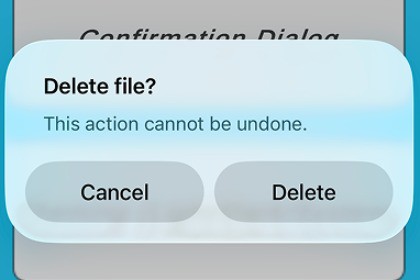
Bring true native popup alerts to Unity for Android™ and iOS. Native Alerts lets you display confirmation, information, and warning dialogs that automatically adapt to system Light/Dark mode.Native Alert is a lightweight Unity plugin that provides fully native popup alerts for both Android™ and iOS without requiring any external libraries, Gradle setup, or Java/Kotlin code.Every alert is rendered using the platform’s real UI components (AlertDialog on Android™ and UIAlertController on iOS), guaranteeing an authentic and future-proof look that matches the user’s device and system theme.Ideal for confirmation dialogs, warnings, simple prompts, and system messages — all accessible from a single, async Unity API.Key highlights:Automatic Dark/Light/System theme detection.Supports up to 3 buttons (OK, Cancel, and an optional extra).No Gradle/Kotlin dependencies — pure C#/Objective-C++.Seamless async/await API: int result = await NativeAlert.ShowAsync(...).Small footprint, zero configuration.Works flawlessly with IL2CPP and Android™/iOS builds.Includes demo scene and source code.Use Cases:Confirmations (“Are you sure?”)Error or information messagesSystem-like alerts that blend with device UIMobile games or apps needing native consistencyAndroid is a trademark of Google LLC.Documentationhttps://github.com/way2tushar/Native-Alert-PopUp-for-Android---iOSSupported Platforms:Android™ (API 21 and above)iOS (11 and above, optimized for iOS 13+ themes)Unity 2021.3 or newerImplementation:Android™: AlertDialog.Builder (System, Light, Dark)iOS: UIAlertController with optional theme override (Dark/Light/System)No third-party dependenciesCompatible with both Mono and IL2CPP scripting backendsFolder Structure:Assets/way2tushar/NativeAlerts/├── Runtime/│ ├── NativeAlert.cs│ ├── NativeAlertBridge.cs├── iOS/│ ├── NativeAlerts.h│ ├── NativeAlerts.mm├── Samples~/│ ├── AlertDemo.cs└── README.mdPackage Size:~50 KB — extremely lightweight.License:Royalty-free for commercial and personal projects.I used AI tools only as a support tool during development, mainly for brainstorming solutions, drafting small code ideas, and helping with documentation wording. All core logic, native Android™ and iOS integrations, bug fixes, testing, and final implementation were done manually by me. Any AI-assisted output was reviewed, modified, and extended to ensure the asset is original, stable, and production-ready.

