






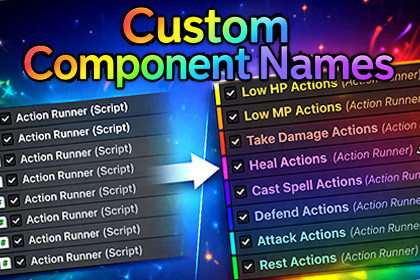
Custom Component Names - Display names + colors for Inspector component headers
Magic Pig Games / Infinity PBR
$22.00
(no ratings)
Jump AssetStore
Custom Component Names makes your Unity Inspector easier to read by allowing custom display names and colors for component headers and object references.Editor only tool. Use whatever pipeline you'd like.Perfect for complex GameObjects, modular systems, and designer-friendly workflows. Very simple to use, powerful for all, easy for beginners.➡️ Documentation➡️ Discord SupportCustom Component Names lets you rename and color-code Unity component headers and component object references without modifying scripts, bringing clarity, context, and organization to even the most complex GameObjects.About This ToolWhether you’re building modular systems, authoring reusable behaviors, or collaborating in teams, long stacks of similar components can become visually noisy and hard to parse.Custom Component Names changes that:Assign clear, meaningful display names to any component right in the InspectorColor-code headers for faster visual scanningDisplay custom names in object reference fieldsPreserve names per-scene/prefab without touching source codeIt works with any component type — built-in or custom.Key Features✔ Rename component headers in the Inspector✔ Add distinct display colors for even better distinction✔ Show custom names in object fields without attributes (optional global mode)✔ Non-destructive — no script changes required✔ Works with prefabs, scenes, and runtime type stacks✔ Simple API for per-field control if needed✔ Kill-switch to enable/disable object-field renaming from the Tools menuWho It’s For✔ Unity developers working with complex or modular components✔ Teams where clarity and context matter✔ Tools programmers, technical artists, and designers✔ Anyone tired of guessing which component does what✔ You, obviouslyWhat You Get✔ Core editor package (no runtime bloat)✔ Easy documentation✔ Demo scene showing usage patterns

