






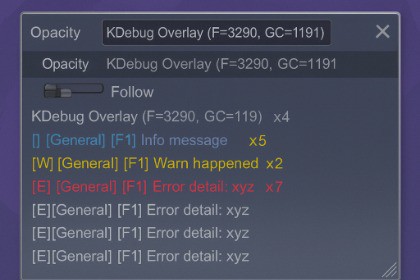
Near-zero-GC in-game log overlay for Unity 6.0+.
Filter, collapse, and export logs in real time—without opening the Console window.KDebug Overlay is a lightweight, near-zero-GC log viewer that runs inside your game.It keeps allocations below 4 KB even under heavy log streaming, making it ideal for runtime debugging, QA, and mobile builds.No need to open the Unity Console—monitor logs instantly, collapse duplicates, and export them as JSON or CSV.Key FeaturesLow-GC rendering (0–4 KB allocation range)Collapse/Expand (merges identical logs with counts)Advanced filters: Regex, #Tag, AND/NOT, Level MaskJSON/CSV export (respects current filters)Hotkeys: Pause, Follow Tail, Copy, ClearResizable & draggable HUD with persistent layout and opacityConditional compilation: enabled in DEVELOPMENT_BUILD or via KDEBUG_FORCE_ONWhy Use KDebugFaster and lighter than Unity’s built-in ConsoleStable memory footprint (~0–4 KB GC Alloc @ 1k logs/sec)Suited for QA, profiling, and mobile debuggingCategory: Tools → Debugging / ProfilingUnity Version: Unity 6.0 (6000.0.58f2) or newerSupported Platforms: Windows, macOS, AndroidScripting Backend: IL2CPP / MonoLanguage: C# (Runtime + Editor partial modules)Dependencies: NoneDocumentation: GitHub README (link)Demo Scene: Included (DemoScene_KDebug.unity)License: MITMemory Footprint: ~0–4 KB GC Alloc @ 1k logs/secKeyboard Shortcuts: F9, Ctrl+F/P/G/K/L/C, Ctrl+J/E, [/], -, =, /Generative AI tools were used to create initial drafts for most of the code in this package, including both runtime and editor components (e.g., log capture/collection, filtering UI, overlay rendering, and utility scripts). The AI-generated output was used as a starting point and then manually refactored, integrated, and validated by the publisher, including architecture adjustments, performance/GC optimizations, null-safety, error handling, and API cleanup. All final code and documentation were reviewed and tested by the publisher prior to submission.

