






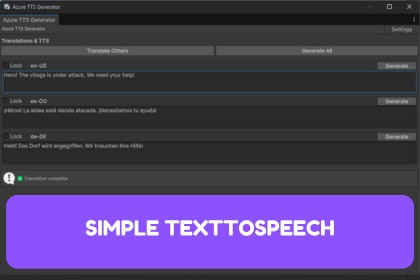
Azure TTS Generator for Unity Editor - Generate high-quality speech audio in 100+ languages using Microsoft Azure's Text-to-Speech service. Simple interface and optional multi translation support.!Prequesites!- Create an Azure account with free subscription tier (watch til 3:47):https://www.youtube.com/watch?v=ZYps6TmBkWk- Create an Azure subscription (free for new accounts)https://www.youtube.com/watch?v=W9CmaHZeOAo- Create and link an Azure AI Speech service to the Simple TextToSpeech toolhttps://www.youtube.com/watch?v=cV0zJWUMts0What It DoesGenerate natural-sounding voices directly in Unity Editor using Azure AI Services. Enter text, select a language, and get a WAV file instantly.Key Features100+ Languages - Access to Azure's neural voice libraryBuilt-in Translation - Translate and generate audio in multiple languages at onceBatch Generation - Create audio for all configured languages with one clickSimple Interface - Clean editor window integrated into Unity Tools menuAuto-Organization - Files saved by language in your chosen output folderPerfect ForLocalizing game dialogue and UI audioPrototyping voice-based featuresCreating accessible audio contentMulti-language tutorials and narrationHow It WorksAdd your Azure Speech API keyConfigure voice preferences for each languageEnter text and generate audioWAV files appear in your project automaticallyWhat You NeedAzure account with at least free subscriptionUnity 2020.3 or newerCompatibilityUnity 2020.3+Editor-only tool (no runtime overhead)All build platforms (audio assets only)DependenciesNewtonsoft.Json (included with Unity).NET Framework 4.7.1+Azure Speech API (requires subscription)Azure Translator API (optional)Audio FormatWAV files (16kHz, 16-bit, mono)Ready for Unity import and compressionJetbrain AI for Readme and tool description, assisting in editor script.

