






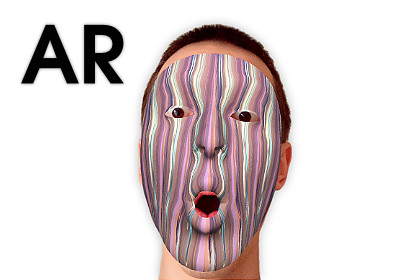
Face Tracking AR App - Texture and Mask Generator
Makaka Games
$109.99
$330.00
67%OFF
Jump AssetStore
Face Tracking AR App — Photo/Video App Template for Mobiles (iOS, Android) with Augmented Reality, Face Recognition & Texture Creation.User-generated content (UGC) is at the heart of the app.1. The asset is downloaded into your project as a Template (Complete Project), which has external dependencies (free or paid). Read the "Getting Started" Tutorial to Import it correctly.2. The asset uses a different Color Picker than in the Video Demo.Face Tracking AR App — Unity Asset and Photo/Video App Template for Mobiles (iOS, Android) with Augmented Reality, Face Recognition & Your Own Texture Creation. This is Texture Generator.[ Documentation | Support Forum | Map of Assets ]User-generated content (UGC) is at the heart of the cross-platform application.🍒 App ModesYou can choose App Mode on the Demo Scene before the start:1. AR Mode (if it’s available, the user can see a button to activate it) with the Real Face Tracking using the AR Foundation (ARCore, ARKit) — Augmented Reality engine.2. Non-AR Mode (beta) — Image/Video Texture Generator.👉 Features of Face Tracking AR AppThis App brings the Magic of Personalization to your amazing Media Content:Express Yourself with Unlimited Variations of Customization.Load Media (Photos & Videos) from Phone Gallery in Real-time.Control Media Parameters as you want.Take Photos & Record Videos.Share Content with Friends on Social Networks.Test in the Unity Editor.🍏 Package ContainsUnified Demo Scene for Both App Modes.Scene with Camera Permission Request.Scene with Storage and Mic Permission Requests.Loading Screen to switch scenes seamlessly.External Dependencies are not included in the package and must be installed (or purchased) separately.🧩 Dependencies🧩🧩 FreeNative Camera:Camera Permission Request,Openning Native Settings of App.Native Gallery — Operating with Phone’s Gallery:Picking Images/Videos,Saving Images.Android Runtime Permissions — Microphone Permission Request.Native Share — Sharing Photos.CompactExifLib — Checking Media Orientation in Editor.🧩🧩 Free or Paid — Video RecordingUnity Asset uses the AVPro Movie Capture plugin and Screen Capture feature:Best-in-class Video Recording/Saving in Phone’s Gallery,Permission Requests: Microphone (iOS), Storage (Phone’s Gallery).AVPro Movie Capture Editions — Comparison Table:Trial — Free:Any FPS — Tested with 60, Watermark (Yes).Basic:30 FPS, Watermark (No).Mobile — Recommended:Any FPS — Tested with 60, Watermark (No).Ultra — Redundant:Any FPS, Watermark (No).✨ LimitationsThe Resulting Video may have an Audio Delay:The more powerful your mobile device, the lower the audio delay.All Photos / Videos are saved automatically to Photos (iOS) / Gallery (Android), but Sharing Video with the Button in the App is Not Available on iOS.AR Mode Requirements:Front/Face/Selfie Camera.iOS: iPhone X or higher.Android: ARCore Supported Devices.To improve Tracking Quality and Frames Per Second (FPS):Increase the Amount of Lighting around you (mostly for Android).Turn Off Power Saving mode that cuts up to 70% of CPU speed (Android).📚 Docs & SupportI state the work of the asset only with uploaded Unity version or with the version indicated in the latest online docs that contain all instructions for the 1st launch.If you find a bug, or you can't use the asset as you need, please firstget the support before leaving a review on the asset store.I am here to help and to improve my assets for the best.Response time can be up to 5 business days.[ Documentation | Support Forum | Map of Assets ]Tested with Mobile Platforms:AR & Non-AR: iOS on iPhone 15;AR & Non-AR: Android on Samsung Galaxy A71.All UI is built with Unity UI (uGUI), except the Color Picker that uses UI Toolkit.

