






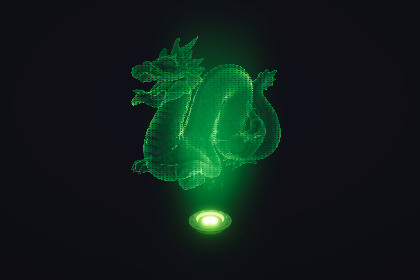
Ready-to-Use Customizable and Modular Hologram VFXTransform your 3D models into a sci-fi holograms with this Hologram VFX package for Unity 6 URP. It includes both Materials and VFX that is customizable to fit your aesthetics. Perfect for games, cinematics, or tech demos, this package combines Shader Graph and VFX Graph to create a customizable, lightweight holographic effect that works on any model. It is also modular with loads of Sub Graphs to combine behaviors.Key FeaturesCustomizable Holograms – Adjust color, scanlines, rim light, emission, and fresnel effects to suit your style.Dynamic Displacement – Add glitchy, unstable hologram effects using vertex displacement with noise-driven motion.Projection VFX – Realistic particle-based light projection with controllable speed, lifetime, direction, and textures.Low Performance Impact – Uses procedural shaders and sprite-based particles for efficiency.Demo Scenes Included – Ready-to-use example setups to help you integrate into your projects quickly.Package ContentsAsset Name: Hologram ProjectorFormat: FBX (Mesh) + PNG (Texture)Variant: Mesh & TexturePurpose: Used for demo purposes, showcasing the hologram effectAsset Name: Stanford BuddhaFormat: FBX (Mesh)Variant: MeshPurpose: Used for demo purposes, testing hologram effectAsset Name: Stanford DragonFormat: FBX (Mesh) + PNG (Texture)Variant: Mesh & TexturePurpose: Used for demo purposes, testing hologram effectAsset Name: SuzzaneFormat: FBX (Mesh)Variant: MeshPurpose: Used for demo purposes, testing hologram effectAsset Name: Utah TeapotFormat: FBX (Mesh)Variant: MeshPurpose: Used for demo purposes, testing hologram effectUsing the MaterialYou can use provided materials or build your own using the provided Shader Graphs. To use this material,simply drag this material to the object in Scene view or attach this Material to the MeshRenderer's material section.Making your own Hologram ShaderWithin the Shader Graph folder, there is provided a template called `Template_Hologram` which includes all the functionalityprovided within this package. I recommend to read the comments and adjust as needed as it will help you with a starting point.After making adjustments, you can create a material from this Shader Graph and attach it to the object for use.Configuring Material PropertiesThe VFX is completely procedural, meaning that you can tweak every parameter to produce different interesting results to craft new patterns,displacement properties, and extra functionalities. To tweak these parameters, go to the Material and adjust the values as needed.Using the Hologram Projection Ray VFXTo use the Hologram Projection Ray, drag the VFX GameObject into the Scene (can be found in VFX folder). It spawns a particle system for therays of light and some dust specs for extra visual flair. Adjust the values of these VFX within the Inspector as needed.ChatGPT helped me to create a description for the Asset Store as well as the README and Documentation of the Package.

