






Grid Inventory System — Equipment, Hotbar, Shops & Save
Null Bolt Studio
$32.99
$43.99
25%OFF
(no ratings)
Jump AssetStore
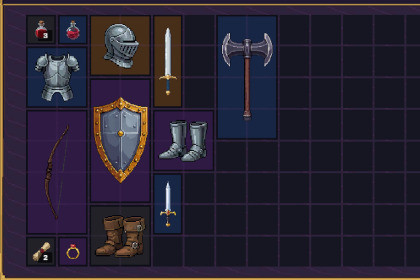
Diablo-style grid inventory with equipment paper-doll, hotbar, shops & stash. Fantasy pixel-art UI included. ScriptableObject items, crash-safe JSON saves. UGUI, BiRP/URP/HDRP, Unity 2022.3+.Unity 2022.3 LTS – Unity 6 supported (tested on both).Pipelines: plain UGUI, no shaders — Built-in, URP, HDRP. Demo scenes require URP.Input: New Input System, Legacy, or Both. Hotbar digit keys need the New Input System.Platforms: PC/Mac/Linux; mobile-ready logic (custom touch mapping needed).Requires TextMesh Pro Essential Resources.Grid Inventory System is a production-ready, ScriptableObject-powered, Diablo-style grid inventory for developers who want the hard parts — placement, rotation, stacking, equipment rules, trading, saving — already solved and easy to extend. Supports Unity 2022.3 LTS through Unity 6, with a fantasy pixel-art UI out of the box.Key FeaturesAdvanced Grid Logic: Multi-cell items (1×1, 2×2, 2×4…) with right-click rotation, stack splitting, merge-on-drop, and a live green/red placement preview.Equipment & Hotbar: 11-slot paper-doll with per-slot type validation, plus a digit-key hotbar driven by a single OnSlotActivated event.Shops, Stash & Economy: Player/Shop/Stash inventory types with right-click buy & sell and a pluggable IEconomy interface.Item Authoring Tools: Item Creator window with a live tooltip-card preview and automatic IDs, Item Browser with search, filters, and bulk edit — plus 22 sample items across five rarity tiers.Crash-Safe Persistence: One-call Save/Load with optional Auto-Save — atomic JSON writes with automatic backup recovery.Four Demo Scenes: Single Inventory, Multi-Inventory (shop + stash), RPG equipment — and a tactical Survival demo included, each with a one-click rebuilder.Zero-Wiring Extras: Item tooltips and the stack-split dialog spawn themselves — no scene setup at all.Modern UI: Built entirely with UGUI and TextMesh Pro; the runtime is pipeline-agnostic (BiRP/URP/HDRP).Works with Item Generator System: import generated items into your inventory in one click.Full C# source, XML-documented API, and the complete online manual at nullbolt.com/docs/inventory-system — kept current with every release.Core Systems & MechanicsScriptableObject Architecture: Lightweight, decoupled item data — easy to integrate and extend.Advanced Grid Logic: Multi-cell footprints (1×1 up to 2×4+) with right-click rotation, stack splitting, merge-on-drop, and one-call auto-sorting.Four Inventory Types: Grid, slot, hotbar (digit keys 1–9, 0), and an 11-slot typed equipment paper-doll — all share one interface, so drag & drop works between them with zero glue code.Shops, Stash & Economy: Player/Shop/Stash types, right-click buy & sell, pluggable IEconomy interface.Extensible by Design: Event-driven API (OnItemAdded, OnInventoryChanged, OnSlotActivated…) plus virtual permission gates for weight limits, quest locks, and custom rules.Editor ToolingItem Creator & Item Browser: Author items with a live tooltip-card preview and automatic IDs; search, filter, and bulk-edit every item in the project.One-Click Scene Tools: In-scene generators (grid, slots, hotbar, equipment) and rebuildable demo scene builders.Smart Inspectors: Setup problems surface as warnings with one-click, undoable auto-fixes.Integration & PerformanceCrash-Safe Save System: Atomic JSON writes with automatic backup recovery, optional Auto-Save, and transparent v1 save migration.Zero-Wiring UI: Item tooltips and the stack-split dialog spawn and parent themselves — no scene setup.Visual Feedback: Real-time placement validation with Green (Valid) / Red (Blocked) indicators and failed-drop flash.UI Tech: Fully powered by UGUI + TextMesh Pro; swappable rarity color palette.Compatibility & RequirementsUnity Version: Unity 2022.3 LTS through Unity 6 (tested on both).Render Pipelines: BiRP, URP, and HDRP (UI-only, no custom shaders); the included demo scenes ship URP camera/light data.Platforms: Tested on Windows, macOS, and Linux. Mobile-ready logic (requires manual touch mapping).Input: New Input System, Legacy, or "Both" — hotbar digit keys require the New Input System.Note: Requires TextMesh Pro (TMP) Essential Resources. Full C# source included, no DLLs.AI assistants (Claude) were used throughout development for code drafting, refactoring, editor tooling, and documentation, including the online manual. Every AI contribution was reviewed, edited, and tested by a human before inclusion. The sample item icons were created with AI image-generation tools, then manually curated, edited, and integrated. The package contains no runtime AI/ML components and does not depend on any AI services.

