




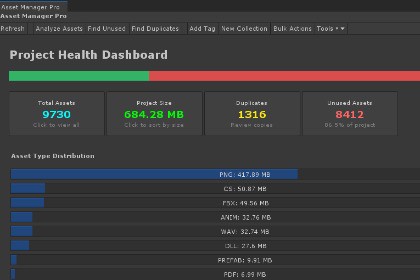
Asset Manager Pro is a powerful editor that helps developers organize, manage, and optimize Unity assets - turning messy libraries into clean, efficient systems with dashboards, search, and previews.Asset Manager Pro is a comprehensive editor extension that revolutionizes how developers organize, manage, and optimize their project assets. Built with performance and usability in mind, this powerful tool transforms chaotic asset libraries into streamlined, well-organized systems that accelerate development workflows.Open via: Tools → Asset Manager Pro → Dashboard (Ctrl+Alt+M / Cmd+Alt+M)Why Asset Manager Pro?🎯 Efficient OrganizationStop wasting time searching for assets. Create a logical structure with color-coded tags, folder colors, and custom collections that make sense for your project.⚡ Time-Saving WorkflowsAdvanced search capabilities, search history, and intelligent filtering let you find exactly what you need in seconds. Bulk operations mean you can manage hundreds of assets with just a few clicks.🔍 Project OptimizationKeep your project lean and performant. The Project Health Dashboard highlights duplicates and unused assets that bloat your build size and slow down iteration times.🚀 Enhanced ProductivityStreamline repetitive tasks with powerful bulk operations. Tag, move, rename, or reimport multiple assets simultaneously, freeing you to focus on creating great content.Core Features📊 Project Health DashboardInstant Overview: Total assets, project size, duplicate count, and unused asset statsAsset Distribution: Visual breakdown by file type with clickable chartsQuick Actions: Jump directly to filtered views for duplicates, unused files, or largest assetsRecently Modified: Track assets that changed recently📊 Intelligent Asset OrganizationTagging SystemCreate unlimited custom tags with color coding for instant visual recognitionAssign multiple tags to assets for flexible categorizationFilter assets by single or multiple tags simultaneouslyEdit tag properties (name, color, description) at any timeCollectionsGroup related assets into manual or smart collectionsHierarchical nesting with drag-and-drop reorderingSmart collections with rule-based auto-population (AND/OR logic)Right-click context menu and full keyboard navigationExport collections as JSON for sharing with team membersSmart Drag & Drop: Move assets from collections to any part of your project with easeFolder ColoringColor-code Project window folders for visual organizationQuick color palette and custom color picker🔎 Advanced Search & FilteringMulti-Field SearchSearch by filename, tags, labels, or any combinationField query syntax — target exactly what you need with t:/type:, name:, tag:, ext:, size:, path:, and modified:, combined with AND / OR / NOTSmart autocomplete suggests fields and values as you typeRegular expression (regex) support for power usersReal-time search results as you typeSearch history — press Enter to save queries; revisit them from the dropdownComprehensive FiltersFile Type: Filter by extension (PNG, FBX, MP3, etc.)File Size: Range-based filtering to find large assetsDate Modified: Time-based filtering for recent changesUsage Status: Show only unused or frequently used assetsDuplicates: Instantly filter to duplicate assets onlyFavorites: Quick access to your starred assets🔬 Asset Analysis ToolsDuplicate DetectionContent-based MD5 hash comparison for accurate duplicate identificationGroups duplicates together for easy review and cleanupSupports textures, materials, models, audio, and moreExport duplicate reports to CSVUsage AnalysisTracks asset references across all scenes and prefabsIdentifies completely unused assets safe for removalShows usage count for each assetDependency graph visualization for complex relationshipsPerformance InsightsFile size analysis to identify optimization opportunitiesAsset type distribution statisticsProject health metrics at a glance🎨 Flexible Viewing OptionsMultiple View ModesDashboard: Project health overview (default)Grid View: Visual thumbnail grid perfect for images and modelsList View: Detailed information in a compact formatCompact View: Maximum density for large asset librariesInteractive Preview WindowFull orbit / pan / zoom inspection for prefabs, models, meshes, and materials — with adjustable lighting and auto-rotateAnimation playback: prefab animations and particle systems play automatically; standalone .anim clips preview on their source rig, a synthesized stand-in built from the clip's own curves, or any model you drag inAudio preview: waveform display with in-editor play and scrubbingCode & text preview: read .cs, .uxml, .uss, .json, .shader, .md, and more as scrollable, selectable text — no need to leave the windowHigh-quality thumbnails are generated and cached, with fallback icons for unsupported types⚙️ Powerful Bulk OperationsBulk Tagging: Add or remove tags from multiple assets at onceBulk Moving: Relocate assets to new folders in one actionBulk Renaming: Rename multiple assets with pattern supportBulk Reimporting: Force reimport of selected assetsBulk Export: Generate CSV reports of asset lists📤 Export CapabilitiesAsset Lists: Export complete asset inventories to CSVUnused Assets Report: Generate cleanup lists for optimizationDuplicate Assets Report: Document all duplicates with file pathsSettings Export/Import: Share configurations across projectsUnity Package Export: Built-in menu to create .unitypackage for distributionTechnical HighlightsAsync asset scanning keeps the Editor responsive on large projectsAssembly definitions for clean compilation boundariesNewtonsoft.Json persistence with legacy data migration and versioned schemaSmart collection rule evaluator with first-class Negate supportCentralized user-facing strings (L10n) ready for future localizationFirst-launch Welcome window with quick-start guidanceBundled EditMode performance benchmarks for collection evaluationWorks when installed in Assets or via UPM package pathDocumentationQuick Start: Documentation/QuickStart.mdUser Manual: Documentation/UserManual.mdRequirementsUnity 2019.3 or laterNewtonsoft Json (installed automatically)SupportActive Discord Community: Join our developer community to get help, share ideas, and connect with other usersDirect link: discord.gg/kinagamesAverage response time: Under 24 hoursEmail Support: For private inquiries and technical issuesContact us at: support@kinaforge.comResponse guarantee: Within 48 business hoursFAQ Section: Answers to commonly asked questionsIssue Tracker: Report bugs and request features through our DiscordRegular Updates: Continuous improvements based on user feedbackWe're committed to providing excellent support and ensuring you get the most out of our asset!Unity 2019.4 LTS+ compatibilityFully extensible with custom collection types and filtering rulesComplete source code included for maximum customizationSmart automation that continuously maintains organization without manual interventionAI coding assistants were used to help write boilerplate code, documentation, and marketing descriptions. All generated content was reviewed, tested, and refined by the developer to ensure quality and correctness.

