






Multi Texture Material Creator (URP) - Editor Tool
Extynct Studios
$5.49
(no ratings)
Jump AssetStore
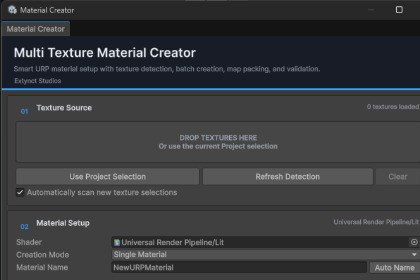
Create URP materials faster with automatic texture detection, batch creation, map processing, previews, and smart material setup from Extynct Studios.Multi Texture Material Creator (URP) - Unity Editor ToolCreate URP materials from complete texture sets in seconds.Multi Texture Material Creator by Extynct Studios is a Unity Editor tool designed to speed up material creation for Universal Render Pipeline projects.Instead of manually creating a material, assigning every texture, configuring import settings, and preparing texture data for URP, simply select or drag in your texture set and let Multi Texture Material Creator handle the setup.The tool automatically detects common texture-map naming conventions, previews the detected maps, processes them for URP when needed, and creates ready-to-use Material assets.Key FeaturesAutomatic Texture DetectionAutomatically identifies common texture maps based on their filenames, including:Base Color / Albedo / DiffuseNormalMetallicRoughnessSmoothnessAmbient OcclusionEmissionDetected textures are shown directly inside the Editor window and can be manually overridden at any time.Drag and Drop WorkflowDrag Texture2D assets directly into the tool or load your current Project window selection.The creator automatically scans the supplied textures and assigns recognized maps to their corresponding roles.Texture PreviewsEach detected texture map includes a preview so you can quickly verify that everything has been assigned correctly before creating your material.Automatic Material NamingUse your own material name or let the tool generate one automatically from the detected texture-set name.For example:SciFiPanel_BaseColor.pngSciFiPanel_Normal.pngSciFiPanel_Roughness.pngcan automatically become:SciFiPanel.matBatch Material CreationHave several texture sets to process?Batch mode automatically groups textures by their shared base name and creates a separate material for each detected set.For example:Rock_BaseColor.pngRock_Normal.pngandMetal_BaseColor.pngMetal_Normal.pngcan be processed together to create both:Rock.matMetal.matin a single workflow.URP Metallic + Smoothness PackingURP/Lit commonly stores Metallic information in RGB and Smoothness in the Alpha channel.Multi Texture Material Creator can automatically generate this packed texture for you.When a Roughness texture is supplied, it is automatically converted using:Smoothness = 1 - RoughnessThe resulting packed texture can then be assigned directly to the URP material.Automatic Texture Import ConfigurationThe tool can automatically configure detected textures for their intended purpose.This includes:Setting Normal textures to Texture Type: Normal MapSetting Metallic maps to Linear dataSetting Roughness maps to Linear dataSetting Smoothness maps to Linear dataSetting Occlusion maps to Linear dataDisabling sRGB where appropriate for data texturesURP Shader SetupUniversal Render Pipeline/Lit is automatically selected when available.You can also assign another shader manually.When using compatible shaders, the tool checks for supported shader properties before assigning textures.Shader Keyword ConfigurationSupported material features can be configured automatically, including:Normal MapsMetallic MapsOcclusionEmissionFlexible Output OptionsChoose where generated materials should be saved.You can:Create materials beside their source texturesChoose a custom folder inside the project's Assets directorySafe Material UpdatingNeed to regenerate an existing material after updating its textures?Enable existing-material update mode to update the Material asset while preserving its existing GUID.This helps prevent references from breaking in:PrefabsScenesRenderersScript referencesOther assetsDetection WarningsThe tool can warn you when:A texture could not be recognizedMultiple textures match the same material roleA required setting is missingAn assigned shader does not expose an expected propertyUnrecognized textures can still be manually assigned.Responsive Unity Editor InterfaceThe interface has been redesigned around a clear workflow:Texture SourceMaterial SetupDetected MapsOutputAdvanced ProcessingCreateThe UI includes texture previews, status indicators, validation messages, foldouts, drag-and-drop support, and layouts designed to work across different Editor window sizes.Supported Naming ConventionsThe detector recognizes common naming terms such as:Base ColorBaseColor, Albedo, Diffuse, ColorNormalNormal, Norm, NRMMetallicMetallic, Metalness, MetalRoughnessRoughness, RoughSmoothnessSmoothness, Smooth, Gloss, GlossinessOcclusionOcclusion, AmbientOcclusion, AOEmissionEmission, Emissive, EmitCommon separators such as _, -, and spaces are supported.Example WorkflowSelect your material textures in the Unity Project window or drag them into the tool.Review the automatically detected texture maps.Select your shader and material name.Choose your output location and processing options.Click Create Material.Your URP material is created and can automatically be selected in the Project window when processing is complete.Batch WorkflowFor larger projects:Select textures belonging to multiple material sets.Switch to Batch By Texture Set mode.Review the detected groups.Click Create Batch Materials.The tool automatically groups and processes each texture set individually.Designed for Faster Material SetupMulti Texture Material Creator reduces repetitive Editor work involved in importing texture sets and preparing URP materials.It is useful for:Environment asset packsPhotogrammetry materialsPBR texture librariesCharacter materialsPropsModular environment kitsLarge imported asset collectionsProjects containing many material variationsSpend less time manually configuring materials and more time building your project.Developed by Extynct StudiosWebsite:https://extynctstudios.com/Discord:https://discord.extynctstudios.com/© Extynct StudiosAutomatic Texture Detection: Detects Base Color, Normal, Metallic, Roughness, Smoothness, Occlusion, and Emission maps using common naming conventions.Manual Map Overrides: Lets you manually assign or replace detected textures before creating the material.Batch Material Creation: Groups texture sets by shared base name and creates multiple materials in one workflow.URP Material Processing: Supports Metallic + Smoothness packing, Roughness to Smoothness conversion, and URP-friendly material setup.Importer Setup Automation: Can automatically configure Normal maps and set data textures like Metallic, Roughness, Smoothness, and Occlusion to Linear.Flexible Shader and Output Options: Supports URP-compatible shaders, custom material naming, source-folder output, and custom output folders.Safe Material Updating: Can update existing materials while preserving their asset references and GUIDs.Improved Editor Workflow: Includes drag and drop support, texture previews, detection warnings, validation messages, and a responsive Unity Editor interface.

