








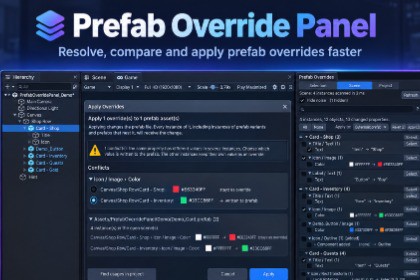
Unity's Overrides dropdown tells you that something changed, not what. It closes when your mouse slips, applies one override at a time, and fills up with changes nobody made: layout groups nudging anchors, TextMeshPro updating internal state, rotation hints, values that differ by 0.00001.Prefab Override Panel is a dockable window that shows every override as a clear before and after, hides the noise, and lets you apply or revert any selection in one step.Built for teams where artists and programmers share scenes and UI prefabs: check what changed before you commit, find the one scene where a button kept its old color, and clean up overrides left behind by a Unity upgrade.KEY FEATURES- Value diffs: every changed property as old → new, with color swatches- Noise filter: hides fake overrides from Layout Groups, Content Size Fitters, TextMeshPro, rotation hints and near-identical values- Bulk Apply and Revert: select any number of overrides, one Undo step- Conflict resolution: when two instances changed the same property differently, choose which value goes to the prefab- Nested prefabs and variants: apply to the outermost prefab or the original one, per object- Apply preview: see every affected prefab, instance and scene before anything is written- Added and removed components and GameObjects, plus missing prefabs flagged clearly- Three views: selected instance, all open scenes, or the whole project (read-only scan of every scene and prefab)- Search with t: (type), p: (property) and i: (instance or file) filters- Export results to CSV for reviews and release checklistsCOMPATIBILITY- Unity 2022.3 LTS and Unity 6 (tested on 2022.3 LTS and 6.3 LTS, Windows)- Built-in Render Pipeline and URP (editor-only, renders nothing)- Nothing is added to your buildsINCLUDED- Full C# source code in its own assembly definition- No dependencies: works with or without TextMeshPro- Demo scene with ready-made overrides- PDF documentationSUPPORTprefaboverridepanel.support@gmail.com

