








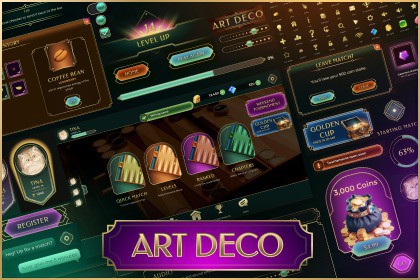
Art Deco - game UI kit gives your game a polished, gold-and-jewel-tone interface without drawing anything yourself. It is built around a backgammon-style game, but every piece works for card games, board games, puzzle games and casual games.Everything is made of standard Unity uGUI prefabs. Drag a prefab onto your Canvas, change the text, colors and pictures in the Inspector, and wire up your own buttons. The art is sliced, so frames, panels, buttons and bars can be resized without distorting the corners.What’s includedFull screens: splash, main menu, home, shop, lobby, loading, victory and defeatDialogs and popups: inventory, achievements, chat, leaderboard, profile, level select, friends, settings, confirm, pause and matchmakingButtons in teal, orange, purple, tintable and disabled styles, plus diamond and round icon buttonsCards in three shapes (arched, square and simple) with hover, press and selected statesControls: checkboxes, radio buttons, toggle switches, tabs, sliders and input fieldsProgress bars, an HP bar, a progress ring and a loading spinnerPlayer frames, avatars, online status, leaderboard rows, friend rows and chat messagesToasts, tooltips, event banners and an animated Level Up banner50+ icons, including coins and six gemsTwo demo scenes. The Demo scene is a playable walkthrough of a whole game’s menus, with navigation wired up. The Components scene shows every piece on one page, including its different states.Easy to customize. Change colors, text and images per prefab, and the layout adapts to the screen size. The kit has a README that explains how to add a piece to your game and the common changes.Requires Unity 2022.3 or newer and TextMesh Pro.

