








HyperLOD – Auto LOD Generator & Mesh Upscaler
Rip Vertices Studio
$17.49
$34.99
50%OFF
(no ratings)
Jump AssetStore
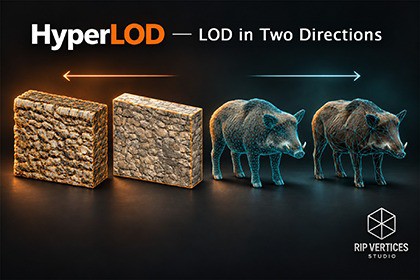
Create close-up HD meshes from normal, height or color textures. Paint detail regions, sculpt surfaces, reduce meshes and build native LOD chains, with additional far-LOD tools for URP.Generate LODs and HD close-up meshes in one Unity editor workflow. • Auto LOD generator – reduce meshes and build native LODGroup chains in a few clicks • Mesh simplifier / decimator – save reduced meshes or full LOD prefabs • HD mesh upscaler – subdivide and add real geometric detail from height, normal or albedo maps • Paint where detail goes – selection mask, mesh parts or UV islands, with soft blending • Sculpt tools – Grab, Draw/Inflate, Smooth, Flatten, replayed on regeneration • Impostors for URP – Fast Cards, Octahedral Depth and Mesh Proxy far-LODs • Built-in, URP and HDRP – original materials are preserved • 5 ready demo props with recipes and LODGroup prefabsDOCUMENTATIONHyperLOD brings HD mesh creation, selective refinement, sculpting and mesh reduction into one Unity editor workflow. Start with a static mesh, choose where detail belongs, preview the result and save real mesh assets with a native LODGroup.HD detail from your texturesUse triangle subdivision with optional shape smoothing (enabled by default) to round a silhouette before adding geometric relief from a height map, an approximate normal-to-height reconstruction, or albedo/color brightness. Adjust shape rounding, displacement strength, filtering and sharp-edge protection. HD and reduced meshes retain the original material references.Put detail where it mattersPaint a visible selection mask, select a connected mesh part or pick a UV island. Choose separate regions for subdivision and geometric detail: the whole mesh, the selection, outside the selection, or no region. Soft weights blend detail strength and refinement levels. Undo/Redo, clear, select-all and invert are included.Refine the result with sculpt toolsGrab, Draw/Inflate, Smooth and Flatten operate on the working HD mesh in Scene View. Sculpt strokes are stored in the recipe and replayed when the mesh is regenerated.Build a practical LOD chainAdd an HD level before the original mesh, create a reduced level after it, or save a reduced mesh for direct assignment. The Decimator defaults to Create LOD and also offers Mesh Only. Native LODGroup screen-height thresholds control the transitions.Additional distance tools for URPThe included Impostor Studio workspace provides Fast Cards, Octahedral Depth and Mesh Proxy far-LOD workflows for URP. These workflows generate their own materials and are separate from the material-preserving HD and Decimator tools.Inspect results before committingCompare original and generated meshes, inspect wireframes and review local geometry/image/cost diagnostics. The Diagnoser's image and render-completion probe supports Built-in and URP. It reports measured local results; it does not guarantee a gameplay FPS improvement or universal optimal settings.Five practical prop examplesThe included URP demo contains an oak trunk, wooden barrel, shipping crate, cast-metal hydrant and modular stone wall. Inspect the original, HD and reduced meshes, saved recipes and native LODGroup prefabs. The stone wall uses scanned CC0 height detail on its visible sides and top, plus specifically authored modular seam constraints.Promotional wild-boar comparisons demonstrate a separate original-to-reduced workflow.The wild-boar model and its textures are not included.Tested in Unity 2022.3 LTS and Unity 6 (6000.6.7f1) with Built-in, URP and HDRP.•Tested in Unity 2022.3 LTS and Unity 6 (6000.6.7f1) with Built-in, URP and HDRP.. Render pipelines: Built-in, URP and HDRP. Use materials compatible with the active pipeline. The included Showcase materials are authored for URP.• HD Detail and Sculpt: Generate denser close-range meshes with geometric relief from height, normal or albedo maps. Control subdivision with a triangle budget and masks, then refine the HD mesh with sculpt brushes.• Decimator: Set a target triangle ratio and surface error tolerance. Adjust seam, border and sharp-edge protection. Save the result as a mesh or install it in a native Unity LODGroup. Mesh tools support readable triangle meshes on MeshRenderer and SkinnedMeshRenderer components.• Far LOD: Choose Decimator, Fast Cards or Octahedral Depth. Fast Cards offers 8 or 16 horizontal views, one or three elevation rings, and blended or nearest-view sampling. Octahedral Depth offers 4×4 or 8×8 capture grids with full-sphere or upper-hemisphere coverage. Card atlases are available at 512, 1024 and 2048 px.• Far LOD cards require static MeshRenderer geometry and supported opaque or alpha-clipped materials. Diagnoser image and timing probes are available in Built-in and URP.• Batch processing supports scene objects and editable prefabs. Test All Methods compares silhouette and local render cost. Experimental Scene Auto can install candidates that pass the selected checks.• Includes demo scenes, five source FBX models and a PDF user guide.DOCUMENTATIONSupport in code writing.

