








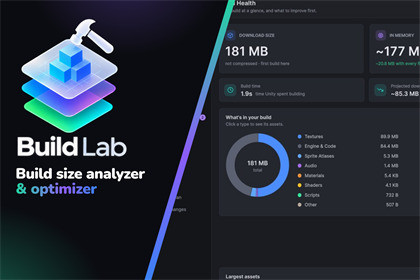
Build Lab: Build Size Analyzer & Optimizer
Tool Foundry
$20.99
$29.99
30%OFF
(no ratings)
Jump AssetStore
Find out what makes your Unity build big and shrink it safely. Size and memory report, 56 checks, duplicate finder, build comparison, size budget and one-click undo.Build size analyzer and optimizer for UnityBuild Lab reads your build, tells you what is wasting space, how much you would save by fixing it, and applies the fix for you. Every change is backed up first, so you can undo anything. Know what is in your build, why it is there and how to shrink it.For mobile, WebGL, PC and console projects. One screen answers three questions: how big is my download, how much memory does it need, and what should I fix first?Unity 2021.3 LTS and newer · editor-only: adds nothing to your game build.See what is in your buildBuild Health: download size, memory, potential savings, build time and your biggest wins, with a Fix button on each.Three ways in: Build & Analyze, Analyze my last build, or Project Scan, which needs no build at all and runs in seconds.Download and in-memory sizes, measured on disk when the build is compressed, plus memory by scene and what the engine and your code weigh.Every asset, largest first, with the scenes that use it and the import settings Build Lab read. Export the list as CSV.Shrink it, with a safety net56 checks across textures, sprite atlases, audio, video, meshes, animation, shaders, fonts, baked lighting, terrain, build settings and leftovers. Each one explains itself.Every suggestion is labelled Safe, Review or Risky. A simulator shows NOW and AFTER before you apply anything.One-click undo: Build Lab backs up the importer settings of every asset it touches, so Undo Changes restores them exactly, even weeks later.Size Budget: set a target and get a plan, safest and biggest savings first.Why is this in my build? Trace any asset back to the scene, Resources folder, Player Settings preload or Addressables group that pulls it in.Where the space hidesSprite atlases, mip maps on UI atlases, baked lightmaps, font atlases and shader variants: the things nobody imported but that fill a build.Duplicates: identical files and images that merely look the same. Build Lab never deletes anything; you choose which copy stays.Compression advice per platform (LZ4HC, Brotli for WebGL) measured on your own build's data, and managed stripping suggestions.Release-day mistakes: development options left on, and *_DoNotShip folders next to the build.Track it over timeCompare any two builds and see which assets grew, which are new or gone, and why: a changed import setting, a changed source file, or an asset that entered or left the build.Compare platforms side by side, asset by asset.Addressables: bundles, groups and content duplicated across bundles.History with a size chart and your budget line. Export a snapshot to share with a teammate.Build serversBuild, analyze and fail the build when it goes over budget from the command line, with exit codes for CI.Good to knowNothing changes in your project until you press Apply. Savings are estimates calibrated against your own build, shown with ~ where approximate.Developed and tested with Unity 6 on Windows; works from Unity 2021.3 LTS.HTML and PDF manual included.Questions or problems? Use the contact link on this page.More tools from Tool FoundryCapture Lab – screen recorder, timelapse and GIF makerImage Lab – PSD and texture editor with layersAudio Lab – audio editor for loops, SFX variations and batch cleanup (coming soon)Requirements: Targets Unity 2021.3 LTS and newer. Developed and tested with Unity 6 on Windows. Editor-only; no Build Lab code is added to player builds. Local data is stored in Library/BuildLab by default.Input: Build & Analyze uses current Build Settings. Analyze Last Build reads Unity's latest build report. Project Scan reads texture, audio and model import settings for the whole project or build-relevant assets. Detailed build reports provide additional asset and scene data.Analysis: Build size, build steps, warnings, errors, generated files, asset breakdown, estimated asset memory and memory by scene. Project Scan sizes, savings and memory figures are estimates; rebuild to measure the result. This is asset analysis, not live runtime memory profiling.Checks: 56 checks covering textures, Sprite Atlases, audio, video, meshes, animations, shaders, fonts, baked lighting, terrain, asset inclusion, duplicates, Build Settings and managed code.Changes: Safe, Review, Risky and Manual labels; estimates for supported size, format, compression, mip-map and audio-quality changes; side-by-side texture previews; selected or batch fixes. Supported settings are backed up in saved change sessions for restoration; those backups must be retained. Manual fixes require developer action. Platform overrides are supported.Inspection: Search, filters, platform import settings and scene references; inclusion tracing through scenes, Resources, preloaded assets and Addressables, plus StreamingAssets identification. Detects identical files and visually similar textures; does not delete duplicates automatically.History: Saved build and scan snapshots, build and platform comparisons, size timeline, CSV asset export and snapshot export/import.Addressables: Bundle, group and duplicated-dependency analysis requires Addressables and an available build-layout JSON report.Budgets and automation: Per-platform size targets and optimization plans with optional quality reductions. Batch-mode build and analysis, snapshot saving and exit codes for CI, including builds that exceed the size budget.Documentation: Assets/BuildLab/Documentation/Build Lab Manual.html and Build Lab Manual.pdf.AI tools assisted with code verification and review, documentation and some visual icons. The developer reviewed the implementation, integration, testing and final content.

