




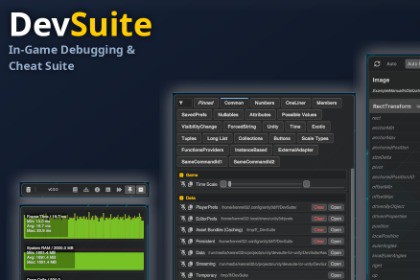
An all-in-one in-game debugging, telemetry, and cheats suite for Unity. Features runtime & editor panels for Commands, Performance Graphs, Hierarchy, Inspector, Logs, and a CLI console.DevSuite is a modern, lightweight, and extensible in-game debugging and development productivity suite for Unity. Built from the ground up using Unity's modern UI Toolkit, DevSuite provides a cohesive suite of tools that work seamlessly both as an in-game runtime overlay (in standalone, mobile, and WebGL builds) and as native Unity Editor Windows.Tired of juggling separate console plugins, FPS counters, runtime inspectors, and cheat menus? DevSuite unifies them into a single, polished package.🎮 Try the Live WebGL Demo: https://fairfun.github.io/devsuite-for-unity/📦 GitHub Repository: https://github.com/fairfun/devsuite-for-unity📦 Installation OptionsIn addition to the Unity Asset Store, DevSuite can also be installed as a Unity Package Manager (UPM) package:• OpenUPM: Available via OpenUPM registry (`openupm add com.ff.devsuite`)• Git URL (UPM): Add package from Git URL in Unity Package Manager:`https://github.com/fairfun/devsuite-for-unity.git?path=DevSuite/Assets/DevSuite`• Asset Store / .unitypackage: Direct import into your project's Assets folder. ✨ Key Features• 🛠️ Commands & Cheats System:- Create custom cheat buttons, sliders, text inputs, toggles, and dropdowns simply by adding C# attributes (`[Command]`, `[CommandButton]`, `[CommandValue]`, `[CommandGroup]`).- Organize cheats into categories, groups, and multi-column rows.- Assign keyboard shortcuts and pin frequently used commands for instant access.• 📊 Performance Telemetry & Graphs:- Real-time performance monitors for FPS, CPU frame time, GPU time, Mono/GC memory, and Draw Calls.- Interactive, collapsible line graphs with hover telemetry.- Extensible API to register custom metrics and telemetry graphs with zero hassle.• 🌳 Runtime Object Hierarchy:- Complete scene hierarchy tree view with live refresh.- Interactive "Pick Mode" to select GameObjects by clicking them directly on-screen.- Search by name, type, component values, and Regular Expressions.- Auto-Pause on selection to freeze gameplay and inspect state safely.• 🔍 Runtime Object Inspector:- Inspect and tweak Component fields and properties live during runtime via reflection.- Two-way sync with the Unity Editor Inspector when running in play mode.• 📜 Logs & CLI Console:- Filter logs by severity (Info, Warning, Error), search query, or regex.- Copy individual logs or full crash reports to clipboard / export to file.- Built-in CLI command line with smart autocomplete and parameterized execution.• 📱 Responsive & Cross-Platform UI:- Dynamic layouts that automatically adapt between Desktop/Landscape and Mobile/Portrait orientations.- Built-in contextual tooltips and customizable hotkeys.- Zero impact on release builds (can be stripped or conditionally enabled via compiler defines).Requirements & Compatibility- Unity Version Support: 2022.3 LTS, and Unity 6 / 6000+- Render Pipeline Compatibility:- ✅ Universal Render Pipeline (URP)- ✅ High Definition Render Pipeline (HDRP)- ✅ Built-in Render Pipeline (BiRP)- Supported Platforms:- Windows, macOS, Linux (Standalone)- WebGL- Android & iOS (Mobile touch & portrait mode supported)- Unity Editor Play ModeArchitecture & Specs- UI Framework: 100% UI Toolkit (`UnityEngine.UIElements`), vector icons, and USS stylesheets (Zero legacy IMGUI in core runtime).- Input Systems: Supports both the New Input System (`com.unity.inputsystem`) and Legacy Input Manager.- Dependencies: Built-in standard Unity packages only (TextCore / UI Toolkit).- Source Code: Full C# source code included, cleanly structured in namespaces (`Ff.DevSuite`).- Samples Included: Interactive Asteroids demo showcasing runtime cheats, CLI commands, hierarchy pick mode, and telemetry graphs.AI tools were primarily used to help create the UI Toolkit layouts and to write and polish English texts across the project, including in-game UI labels, tooltips, and documentation. All code, UI elements, and texts were manually reviewed, edited, and tested in Unity by the author. The package contains no AI-generated images, pre-trained AI models, or third-party AI runtime services.

