




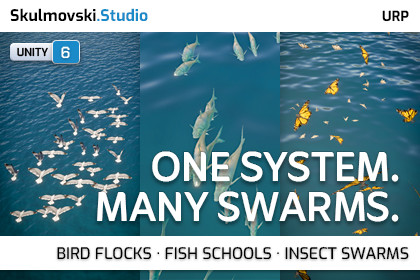
Boids VFX · GPU Bird Flocks, Fish Schools & Insect Swarms
Skulmovski Studio
$17.45
$34.90
50%OFF
(no ratings)
Jump AssetStore
Bring your environments to life with GPU-driven bird flocks, fish schools and insect swarms. Shape their movement with habitats, splines and interactive zones — no custom movement scripts required.Unity 6 or newer; tested with Unity 6000.0.77f1.Universal Render Pipeline (URP).Unity Visual Effect Graph package.GPU Compute Shader support on the target platform and graphics API.━━━━━━━━━━━━━━━━━━━━━━━━━━━━━━━━━━━━━Bring Your Environments to Life with Reactive SwarmsCreate bird flocks, fish schools and insect swarms with one GPU-driven boids system. Use included examples or your own compatible meshes, and shape movement, navigation and environmental interactions directly in the Editor — no custom movement scripts required.⚡ ONE SYSTEM. MORE POSSIBILITIES.Bird Flocks, Fish Schools & Insect SwarmsBuilt-In Creatures & Custom Mesh SupportGPU Flocking & Procedural Mesh Animation11 Ready-to-Use Behaviour PresetsVolume, Follow & Spline NavigationObstacle Avoidance, Attraction, Repulsion & FlowTrigger Zones & Secondary VFXEditor Tools & Optional Runtime APIFor a quick product overview, check out the “At a Glance” image in the gallery.📖 Full documentation is publicly available before purchase.Explore the complete Boids VFX Documentation in PDF or Markdown format.━━━━━━━━━━━━━━━━━━━━━━━━━━━━━━━━━━━━━🧠 GIVE EVERY SWARM ITS OWN MOVEMENT STYLE━━━━━━━━━━━━━━━━━━━━━━━━━━Create tightly grouped fish schools, coordinated bird flocks or loose, scattered swarms using adjustable Cohesion, Alignment, Separation and Wander forces.Fine-tune movement speed, steering response and individual variation. Start with 11 included behaviour presets, then save your own settings as reusable .swarm files.The same visual effect can produce very different movement patterns simply by changing its behaviour settings.🌍 SHAPE WHERE YOUR SWARMS LIVE AND TRAVEL━━━━━━━━━━━━━━━━━━━━━━━━━━Define habitats using Boxes, Spheres, Capsules and Cylinders, or combine multiple shapes into larger connected volumes.Attach a habitat to a moving Transform and let boids catch up with the region as it moves. Alternatively, guide them along open or looped spline routes while retaining flocking, wandering and environmental influences.Use these tools to create local wildlife habitats, moving swarms and repeatable flight paths.🧲 MAKE SWARMS REACT TO THEIR ENVIRONMENT━━━━━━━━━━━━━━━━━━━━━━━━━━Build interactive behaviour using configurable environment zones:Obstacle Avoidance — steer boids around defined primitive obstacles.Attraction — draw nearby boids towards stationary or moving targets.Repulsion — push boids away from selected areas or objects.Flow — guide movement through directional forces, with optional turbulence.Combine these influences with habitat boundaries and flocking to create movement that changes naturally as your scene evolves.Navigation uses local steering rather than NavMesh pathfinding or exact mesh collisions.🦋 CREATE FISH, BIRDS, INSECTS AND ABSTRACT SWARMS━━━━━━━━━━━━━━━━━━━━━━━━━━━━━━Choose from four visual approaches: Fish Body Bending, Wing Flapping, Non-Deforming Mesh and textured Quads.The package includes 10 VFX Graphs, with Lit and Unlit options and Simple/Expensive variants for wing deformation.Procedural fish bending and wing flapping run in the shader. Customize deformation using animation parameters and Vertex Color.R masks on suitably prepared meshes.Six textured demonstration models — seagull, fish, butterfly, moth, fly and honeybee — provide examples of the available visual styles.Use your own compatible meshes and textures to develop additional creatures or abstract effects.✨ ADD SECONDARY EFFECTS AND GAMEPLAY REACTIONS━━━━━━━━━━━━━━━━━━━━━━━━━━━━━━Enhance your swarms with two optional secondary VFX branches:Continuous — emit particles while boids are alive.On Die — create bursts when boids die.Configure the appearance and movement of each branch independently.Use Death Zones to remove boids, or Trigger Zones to detect when a configured portion of the swarm has entered or occupied an area.Connect trigger events to gameplay responses such as activating effects, changing object properties or switching swarm movement modes. Trigger statistics are calculated on the GPU and delivered asynchronously.🛠️ CONFIGURE MOVEMENT AND APPEARANCE IN THE EDITOR━━━━━━━━━━━━━━━━━━━━━━━━━━━━━━━Swarm Control Center brings movement, habitats, population, presets, environment zones and triggers into one configurable Editor window.Use the VFX Setup Assistant to check project requirements and access the included demonstration and tools. Preview swarm movement in Edit Mode without entering Play Mode.Additional tools help prepare meshes and convert solid material colours into a texture.Standard swarm movement is configured through the provided components and Editor controls. Custom gameplay behaviour can be implemented using the optional Runtime API, including playback control, parameter changes, smooth transitions and movement-mode switching.⚠️ KNOWN CONSTRAINTS & DESIGN TRADE-OFFS━━━━━━━━━━━━━━━━━━━━━━━━A single SwarmSystem supports up to 1,000 boids. Performance depends on population, models, zones and effects. Test your configuration on target hardware.Boids are GPU-simulated particles, not individual GameObjects with Transforms, Animators or Rigidbodies.Navigation uses steering and primitive obstacle representations, not NavMesh pathfinding or exact MeshCollider collision. Tight or complex geometry may require adjustments.Fish and wing shader animation requires suitable mesh geometry and Vertex Color.R masks. It does not provide skeletal animation or flight/landing state transitions.Dead boids do not automatically respawn. Restart or reinitialize the population to begin another cycle.Main VFX particles have a technical lifetime of 9,999 seconds of VFX time. Longer-running effects require restarting the simulation cycle.Trigger events use asynchronous GPU readback, are not frame-exact collision callbacks, and support up to three unique Trigger Zones per SwarmSystem.Further behaviour details, API examples, configuration instructions and performance considerations are covered in the documentation.💬 DOCUMENTATION & SUPPORT━━━━━━━━━━━━━━━━━For detailed setup instructions, parameter references, Runtime API examples and troubleshooting, visit the Boids VFX Documentation.The documentation is freely accessible before purchase in PDF and Markdown formats.For questions or technical support:Discord: Join the communityEmail: care@skulmovski.studioURP PACKAGE10 VFX Graph effects — 5 Lit and 5 Unlit3 VFX Subgraphs8 Shader Graphs2 Shader Subgraphs1 Compute Shader11 HLSL files11 behaviour presets27 materials36 textures, ranging from 24×24 to 2048×20489 FBX models24 prefabs1 demo sceneRuntime C# systems and public APISwarm Control CenterMaterial Colors to Texture BakerURP VFX Setup AssistantDOCUMENTATIONPDFMarkdown

