




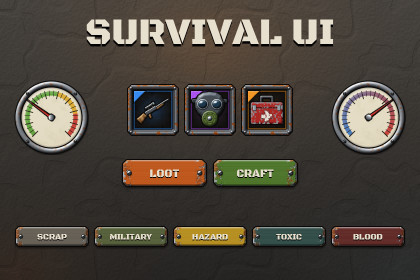
Survival game UI: 16 clickable screens, 905 sprites in 5 themes, 49 items, gauges, drag-and-drop backpack, crafting and 33 scripts. Built-in, URP, HDRP.Built-in, URP and HDRP: sprites, stock Unity UI and TextMeshPro only - no custom shaders. In HDRP use Screen Space - Overlay canvases (the demo switches itself).Requires com.unity.ugui (Unity UI, built in). Import TMP Essentials when Unity asks.Works with the old Input Manager and the new Input System.A complete, working survival / post-apocalyptic game interface - open the demo, press Play and click through a whole game: main menu, loading, the survival HUD, backpack with equipment, crafting, looting, map, journal, radio, trader, character, base building, settings, death and day summary.Every sprite is drawn in worn, bolted, painted steel - chipped paint, pitted rust, hazard stripes, duct tape and torn paper - at native 1920 x 1080 resolution, and nine-sliced so every panel, window, button, bar and slot stretches cleanly: all the wear lives in the corners, and a seamless grime overlay (Image Type Tiled) dirties the panel faces at any size. 16 screens come ready-made as prefabs, wired together and brought to life by a small set of dependency-free scripts, so you start from a working survival interface instead of an empty canvas.WHAT'S INSIDE- 16 ready-made screens (prefabs): main menu, survival HUD, backpack + equipment, crafting, loot, map, journal, radio, trader, character, base building, settings, loading, death, day summary, popups- A clickable demo scene: every screen reachable by its buttons, keyboard shortcuts (I, C, J, M, B, T, K, O, Esc), number keys 1-6 for the quick-use bar, or a page bar- 905 sprites in 5 painted-steel themes: Scrap (rust and orange), Military (olive and sand), Hazard (yellow), Toxic (teal and acid green), Blood (dark red)- 49 illustrated items: medkit, bandage, pills, syringe, chemicals, water filter, canned food and soup, water bottle, energy bar, ration, rifle, pistol, knife, machete, crowbar, fire axe, nail bat, molotov, grenade, ammo box, bullets, wrench, hammer, flashlight, lighter, matches, walkie-talkie, car battery, jerrycan, duct tape, rope, binoculars, compass, map, key, gas mask, helmet, vest, backpack, boots, gloves, logs, rocks, scrap, cloth, nails, circuit board, gear- Survival HUD: analog gauges (radiation, temperature, pressure) with a swinging needle, health / hunger / thirst / stamina / radiation bars, a horde threat bar, compass, radar minimap, quick-use bar, status effects, unit frame- Inventory: slots with stack badges, five rarity frames (common to legendary), 10 equipment slots with silhouettes, large slots, locked slots, tooltips, price tags, resource counters- Survival props: ruled notes, sticky notes, clipboard, map scrap, duct / masking / hazard tape, map pins, markers, dog tag, padlock, blood splatters, damage / frost / toxic / cracked-glass screen overlays- Every control a game needs: buttons in four colours plus the theme paint, four states each, square, hex and small icon buttons, checkboxes, radio buttons, switches, sliders, tabs, dropdowns, input fields and scroll views- Windows and panels: bolted windows with a hazard-striped title plate and close button, panels, headers, cards, toasts, notifications, list rows, radio message bubbles- 108 white icons you tint with Image.color, 6 hardware cursors, 6 seamless background tiles and 5 full-screen 1920 x 1080 backdrops- 439 prefabs in total, 6 sprite atlases, 3 font families (Black Ops One, Barlow Condensed, Special Elite) as TextMeshPro font assetsBROUGHT TO LIFE BY 33 SMALL SCRIPTS (no DOTween, no other packages)- Drag-and-drop inventory: drop to move or swap, equipment slots that accept only their kind- Analog gauges with an eased, trembling needle; a quick-use bar with number keys- Hover tooltips, radial cooldowns, a crafting button with a progress bar- Screen manager with fade and pop transitions and a back stack, popups, keyboard shortcuts- Tabs, list and card selection, switches, option cyclers, slider labels- Typewriter radio messages, counters that count up, bars that fill, toasts, idle motion- Hardware cursors (pointer, crosshair, interact, loot, inspect, busy) with hover swapping- Navigation without code: a button component that shows a screen, goes back, or opens and closes popupsREADY TO USE- Built-in, URP and HDRP: stock Unity UI and TextMeshPro, no shaders- Works with the old Input Manager and the new Input System- Documentation: README (txt and rtf) with a quick start, the demo guide and a script referenceEverything shown in the screenshots is included in this package.Sprite count: 905 PNG spritesSprite sizes: UI elements up to 640 px; items 128 x 128; icons 96 x 96; cursors 64 x 64; backdrops and damage / frost / toxic overlays 1920 x 1080; cracked-glass overlay 1024 x 1024; tiles 512 x 512Resolution: authored for a 1920 x 1080 landscape screen at native resolution (Canvas Scaler reference 1920 x 1080)Nine-slice: borders pre-set on every stretchable sprite; seamless grime overlay for Image Type TiledThemes: 5 painted-steel themes (Scrap, Military, Hazard, Toxic, Blood), 128 sprites eachItems: 49 illustrated items, 6 cursorsIcons: 108 white tintable iconsPrefabs: 439, including 16 ready-made screensSprite atlases: 6 (one per theme, plus Common)Animated: YesAnimation type: script-driven UI tweens (screen transitions, popups, button feedback, gauge needles, cooldowns, toasts, typewriter, count-up, fills, idle motion); no Animator controllersVector or pixel: raster PNG, rendered from vector shapes, anti-aliased, no upscalingScripts: 33 runtime C# scripts (namespace HS.SurvivalUI), no dependencies, no static stateFonts: Black Ops One and Barlow Condensed (SIL Open Font Licence 1.1) and Special Elite (Apache Licence 2.0) as TextMeshPro font assets, licences includedRender pipelines: Built-in, URP, HDRPDemo scene: 1, a clickable game linking all 16 screensAI was used as a coding assistant. Every sprite in this package - including the illustrated items, cursors and backdrops - is drawn procedurally by Python scripts (shapes, height-field lighting, noise, gradients and anti-aliasing computed in code), and the Unity prefabs, demo scene and runtime scripts are generated or written in C#; those scripts were written with the help of an AI assistant. The designs, colour palettes, layouts and quality checks were directed and reviewed by the publisher, and every screen was reviewed visually before release. No AI image generation models were used.

