




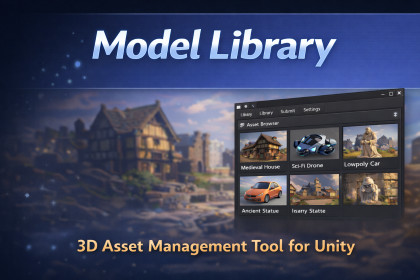
Model Library is a Unity Editor tool for managing, previewing, and organizing 3D models in a centralized repository, designed to improve team workflows and asset reuse.For more information, consult the GitHub release page: https://github.com/PierreGac/Unity-ModelsLibrary.gitModel Library is a Unity Editor tool designed to help teams organize, browse, and reuse 3D models efficiently across projects.Instead of relying on scattered folders or external file explorers, Model Library provides a centralized, structured repository directly inside the Unity Editor, making it easier to manage large collections of models and reduce duplication.Key FeaturesCentralized 3D model repository inside UnityFast model preview and inspectionMetadata-based organization and filteringEditor-integrated workflow (no runtime overhead)Designed for team collaboration and consistencyClean, extensible architecture suitable for pipelines and toolsTypical Use CasesTeams managing large libraries of 3D assetsTechnical artists organizing reusable modelsStudios standardizing asset naming and metadataEducational or industrial projects requiring structured model repositoriesOpen SourceThis asset is free and open-source (MIT License).The full source code, documentation, and issue tracker are available on GitHub.Model Library is an Editor-only Unity tool that provides a structured system for managing and previewing 3D model assets within a project.Technical DetailsEditor-only: no runtime code includedNamespaces: isolated and non-intrusiveArchitecture:Custom Editor WindowsAsset database integrationMetadata-driven asset indexingNo external dependenciesNo background processes or auto-executing scriptsNo network accessNo analytics or telemetryCompatibilityUnity versions: 6000 (should work from 2022 LTS and newer, but it needs testing)Render pipelines: Built-in, URP, HDRPPlatforms: Editor only (Windows, macOS [not tested], Linux [not tested])InstallationInstall via Unity Asset StoreAlternatively available via GitHub (UPM Git URL)SupportBug reports and feature requests are handled through the GitHub issue tracker.ContextI am an old-fashioned Unity 3D developer and, like many developers who have built tools for years, I was initially reluctant to change my way of working in order to stay within my comfort zone. Throughout my career, I have created many handcrafted Unity editor tools and utilities.However, I eventually realized that AI can meaningfully assist in this process. Many of the tools I develop are quality-of-life (QoL) tools, and AI can significantly accelerate their initial creation and iteration.AI and Editor CodeAI-generated code often contains mistakes and must be carefully reviewed, especially when it comes to Editor scripts. AI tools may rely on outdated or deprecated Unity APIs, or produce patterns that do not align with Unity’s recommended practices.This is particularly true for asynchronous operations (async / await). AI tends to generate pure C# asynchronous code that does not correctly account for Unity’s main thread constraints and resource management model. In addition, async/await behaves differently in the Unity Editor compared to runtime, and AI systems often struggle with these nuances.In This ProjectThis project is the first one in which I intentionally integrated AI into my development workflow. Mistakes were made—and are still being made—but that is part of the learning process.AI was primarily used to lay down initial foundations. From that point on, it is the developer’s responsibility to manually review, adjust, and fix the generated code. While AI can assist in some refinements, I do not fully trust it for precise debugging tasks without the risk of introducing regressions.Only free AI tools were used during development (Copilot, ChatGPT, Cursor, DeepSeek).AI also proved extremely valuable for generating documentation, comments, and changelogs. These elements are often neglected by developers—largely because they are time-consuming and not particularly enjoyable—but they are essential for users, collaborators, and even your future self. AI is also very effective for translations.Now that version 1.0 is released, AI is mainly used for small improvements, such as exception handling, log quality, and minor refactoring.Note for DevelopersAI is here, whether we like it or not, and developers must adapt accordingly. Modern developers are no longer just “code-writing machines”; they increasingly act as architects, guides, and code reviewers.This role requires strong technical knowledge and up-to-date programming skills, as AI can generate large volumes of code and introduce new patterns and semantics very quickly. Developers must be able to understand, constrain, and communicate effectively with AI tools.Simply asking “ChatGPT, write this code for me” is no different from blindly copying code from GitHub or Stack Overflow. It might work—but what have you actually learned from it?

