








Archetype Character Generator – Stylized Procedural NPCs
Quest Fox Studio
$142.00
Jump AssetStore
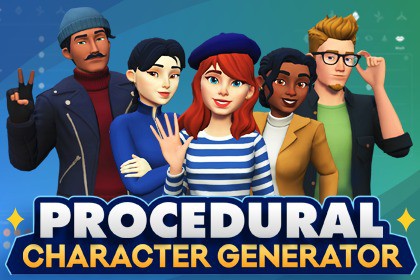
Fill your world with varied stylized NPCs. Design an Archetype once, then roll, spawn or paint endless characters that fit it, or build each character by hand in the full character creator.Tested with Unity 2022.3 LTS and Unity 6 (6000.0 and 6000.3). URP and HDRP; Built-in is not supported. Magica Cloth 2 is optional and sold separately.Archetype Character Generator is a stylized 3D character creation and procedural NPC generation tool for Unity.Create individual characters with detailed control over their appearance, selectively randomize the features you want to explore, or build reusable Archetypes that define entire populations of characters through custom ranges, asset pools, colors and weighted probabilities.Detailed Body CustomizationIndividual parameters can be edited manually or randomized independently.Adjust height, body size, shoulders, waist, hips and other body proportions.Detailed Face CustomizationReusable face presets can be incorporated into your workflow.Extensive facial controls for eyes, brows, nose, mouth, jaw, chin and other facial features.Facial parameters can be adjusted individually or randomized.Hair & Facial HairMale characters also include facial hair options.Modular hairstyles for both genders (12 male, 23 female, plus 6 bangs) with customizable hair colors, and extra versions that fit under hats.Skin, Eyes & Facial ColorsDetailed iris and pupil controls.Artist-authored skin tone palette.Customizable eye and lip colors.Freckles support.Expression SystemExpressions can also be randomized within a user-defined range.Blend between multiple expressions using a continuous 2D expression map.👕 Modular Clothing & Accessories 👕Characters can be assembled from independent clothing and accessory categories, allowing outfits to be mixed and matched rather than relying only on fixed character presets.Tops (31 Male and 32 Female)Bottoms (9 Male and 18 Female)Footwear (17 Male and 22 Female)Hairstyles (12 Male and 23 Female, plus 6 Female Bangs), with extra versions that fit under hatsFacial Hair (6 Male)Full Outfits (1 Male and 6 Female)Hand Assets (2 Male and 5 Female)Backpacks (1 Male and 2 Female)Earrings (1 Male and 4 Female)Glasses (4 Male and 4 Female)Hats (8 Male and 8 Female)Neck Accessories (2 Male and 5 Female)Wrist Accessories (3 Male and 3 Female)In total there are 235 selectable items across both genders.🌟 Procedural Archetype Designer 🌟Instead of designing every NPC one at a time, create reusable Archetypes that describe what an entire group of characters can look like.Custom Asset PoolsChoose exactly which clothing, hairstyles and accessories are allowed to appear within an Archetype.Min–Max Parameter RangesDefine allowed ranges for body and facial features instead of fixed values.Weighted ProbabilitiesMake individual assets or colors common, uncommon or rare using relative probability weights.Overrides - Selective RulesAn Archetype does not need to control everything.Define rules only for the categories you care about while allowing the generator's default behavior elsewhere.Archetype PreviewerGenerate multiple characters simultaneously to visually evaluate your Archetype.Adjust ranges, asset selections or weights and regenerate to immediately see how the resulting population changes.Create Archetypes for whatever population fits your game: any type of modern-day person you can put together from the clothing, colors and body and face ranges. Design one, then fill a street, an office or a crowd with characters that belong together.Flexible RandomizationRandomization is not limited to a single “Random Character” button.Choose exactly what should change while preserving everything else.Randomize the complete characterRandomize individual categoriesRandomize individual facial or body parametersKeep a face while exploring outfitsKeep clothing while generating new charactersRandomize clothing without changing its colorsChange hairstyles without changing hair colorsRandomize characters while remaining inside an active ArchetypeReal-Time 3D PreviewImmediately see changes while editing your character.Character Saving & LoadingSave complete character recipes and reload them later.Archetype Saving & LoadingCreate a reusable library of your own procedural character Archetypes.Version HistoryBrowse previous generated characters visually and return to earlier results.Undo / RedoStandard undo and redo support while editing.Custom ColorsArtist-authored colorways together with custom color editing.Asset-Specific Color MasksIndividual clothing assets can expose multiple independently editable color regions.🎯 From Creator to Game 🎯Character SpawnerDrop it into any scene, pick a saved character or an Archetype from a searchable list, and spawn. Options include async spawning, a seed for repeatable archetype characters, cloth on/off, look-at, expressions and your own Animator Controller. Every Inspector button is also a public method, so you can drive it from your own scripts. Export as Prefab saves a spawned character as a plain prefab that works without the generator. New in 1.3.0: spawned characters blink, look around and notice the player (Character Look), idle in a way of their own (Character Idle), and come with five levels of detail for crowds.Archetype Paint ToolPaint or scatter NPCs from an Archetype straight into the Scene view, like painting foliage. Scatter mode spaces characters evenly, and every character is different while still fitting the Archetype.🧩 Compatibility 🧩Unity & Render PipelineUnity 2022.3 LTS and Unity 6 (tested with 6000.0 and 6000.3). Universal Render Pipeline (URP) and High Definition Render Pipeline (HDRP). Built-in is not supported.Unity Humanoid / Mixamo CompatibleCharacters are compatible with Mixamo animations and standard humanoid animation workflows.Magica Cloth 2 CompatibleCompatibility with Magica Cloth 2 is supported for projects that want additional cloth simulation.Magica Cloth 2 is not included and must be purchased separately from the Unity Asset Store.📚 Links & Documentation 📚Discord linkDocumentationArchetype Video GuideAPI Overview Video❓ FAQ ❓Q: Was AI used in the creation of this asset?A: Not for any of the art: every character, 3D model, texture and material is handmade by our artists. The design, architecture and code are the work of our engineers, built over more than five months. Toward the end of development, we used AI tools to help with optimization and catching bugs.Q: What is an Archetype?A: An Archetype is a reusable set of character-generation rules. Instead of describing one fixed character, it can define allowed body and facial ranges, clothing and accessory pools, colors and weighted probabilities. Generating from the Archetype produces different characters that remain visually related.Q: Can I save my own Archetypes?A: Yes. Archetypes can be named, saved and loaded again through their own library.Q: Do I have to use Archetypes?A: No. You can use the package as a conventional character creator and generator without creating an Archetype.Q: Can I still create characters manually?A: Yes. The Archetype system is an additional workflow rather than a replacement for manual character creation. Characters can be customized directly using the body, face, clothing, hair, color, accessory and expression controls.Q: Can I randomize only part of a character?A: Yes. Character categories can be randomized selectively, and many individual parameters have their own randomization controls. This allows you to preserve the parts you like while continuing to explore others.Q: Can clothing colors be customized?A: Yes. Colorable clothing includes artist-authored colorways, while custom color controls allow supported material regions to be edited individually. Different clothing assets can expose different numbers of editable color regions.Q: Can I save characters I create?A: Yes. Complete character recipes can be saved and loaded through the included character library.Q: How do I use the characters or archetypes I created in my game?A: Add a Character Spawner to your scene (GameObject > Archetype Generator > Character Spawner, or drag in the prefab), pick a saved character or an Archetype, and press Spawn Character; in your game it spawns on Start. From your own scripts, call SpawnCharacter(recipe) on the spawner. Items you add to the project yourself are included in builds. More in the documentation and our technical showcase video.Rigging: Humanoid-compatible with shared bone mappingAnimations: 1 idle (works with Mixamo and other Humanoid clips)Models: 258 FBXPrefabs: 373Triangles: ~200–20,800 per meshTextures: 1,622, primarily 256²–2048²Materials: 515Render Pipeline: URP and HDRPShaders: custom Shader Graph shaders (URP and HDRP) and the pipeline's Lit shaderIncluded LOD: Yes. Five levels per character (LOD 0 to LOD 4) in a Unity LOD Group, made when the character is builtAll art in this package (characters, 3D models, textures and materials) is made by hand by our artists, with no generative AI. The tool's design, architecture and implementation were done by our engineers. AI tools were used in the later stages of development, to help with performance optimization and finding bugs.

