




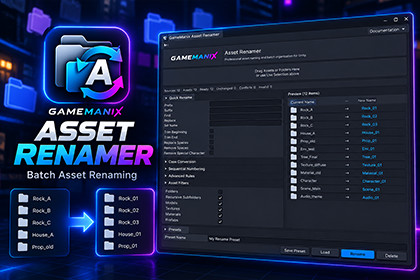
GameManix Asset Renamer is a professional Unity Editor tool for batch renaming, organizing, previewing, and safely managing project assets with flexible rules and reusable presets.GameManix Asset Renamer is an Editor-only utility and does not depend on a specific rendering pipeline. It is designed to work with projects using Unity Built-in Render Pipeline, URP, or HDRP. The tool does not modify or replace materials, shaders, render-pipeline settings, or project rendering configuration.GameManix Asset Renamer is a professional Unity Editor utility designed to make asset naming and organization faster, safer, and more consistent.Note : To keep the package lightweight, the sample scenes, assets and additional files shown in the tutorial are not included in the package. The tool can be used directly in your existing Unity project without any additional sample files or scene setup.Rename individual assets or large groups of assets directly from the Unity Editor using flexible rules, live previews, and reusable presets.KEY FEATURES• Batch rename assets and folders• Find and Replace• Prefix and Suffix• Set Name• Sequential numbering• Case conversion• Trim leading and trailing spaces• Remove spaces and special characters• Advanced renaming rules• Asset-type filtering• Recursive folder processing• Live rename preview• Conflict and invalid-name detection• Reusable rename presets• Safe editor-based workflow• Undo support through Unity's asset workflowSUPPORTED ASSET TYPESThe tool can work with common Unity project assets including folders, models, textures, materials, prefabs, animations, scenes, audio, and ScriptableObjects.EDITOR-ONLY WORKFLOWGameManix Asset Renamer is an Editor utility. It does not add runtime components to your game and does not require a scene, prefab, camera, or runtime setup.Open it from:Window → GameManix → GameManix Tools → Asset RenamerA sample/test kit is included to demonstrate the workflow with representative Unity assets.CUSTOMIZATIONCreate your own naming workflow using configurable rename rules, filters, sequential numbering, and reusable presets.RENDER PIPELINEThe core Asset Renamer functionality is render-pipeline independent. It does not modify shaders, materials, render-pipeline settings, or project rendering configuration.REQUIREMENTSUnity 2022.3 LTS or newer.No third-party Asset Store package dependencies are required.• Unity Editor extension• Editor-only workflow• Batch asset renaming• Folder and recursive-folder processing• Find & Replace• Prefix / Suffix• Set Name• Sequential numbering• Case conversion• Whitespace cleanup• Special-character cleanup• Advanced rename rules• Asset-type filters• Live rename preview• Conflict detection• Invalid-name detection• Reusable rename presets• Unity Undo integration• Sample/Test Kit included• No runtime components required• No scene setup required• No third-party Asset Store dependencies• Compatible with Unity 2022.3 LTS and newer• Render-pipeline independentAI tools were used as an assistive development tool during the creation of this package.AI assistance was used to help develop and review portions of the Unity Editor C# code, troubleshoot implementation issues, refine editor workflows, and draft documentation text.The package was then manually reviewed, integrated, tested, and modified for the GameManix Asset Renamer workflow. Functionality, UI behavior, asset handling, folder structure, documentation paths, Unity Editor integration, validation issues, and Asset Store requirements were manually reviewed and adjusted during development.AI is not a runtime dependency of the package, and the published tool does not connect to or require an external AI service.

