




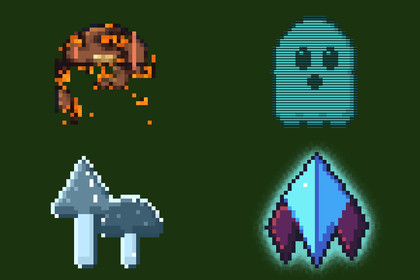
40 drop-in 2D sprite shaders for Unity, built for pixel art. Put any of them on a SpriteRenderer with one line of C#, or as a material from the inspector.Works in any pipeline: the effects are unlit sprite shaders. Tested in Built-in, URP (2D and Universal Renderer) and HDRP. In HDRP the colours come out under HDRP's default exposure and post-processing unless the camera turns them off.40 drop-in 2D sprite shaders for Unity, built for pixel art. Put any of them on a SpriteRenderer with one line of C#, or as a material from the inspector.SpriteFX.Flash(player); // hit flash, own material back afteryield return SpriteFX.DissolveOut(enemy).Wait(); // then Destroy(enemy.gameObject)SpriteFX.Apply(chest, "glow_outline").Set("glow_color", Color.yellow);What's insideflash — hit flash to any colouroutline — pixel-perfect, outside or inside, 1–16 pxglow outline — soft, pulsing, HDR-readydissolve — noise or directional, glowing edgeburn — charred band and flickering emberspalette swap — up to 8 colours, enemy variantssilhouette — flat or shaded tintpixelate — whole-pixel stepswind sway — grass and trees, out of phaseshine — sweeping highlight for pickupshologram — scanlines, flicker, glitchesfreeze — icy recolour, frost rim, glintsglitch — row jumps and RGB splithue shift — static or rainbow cyclingstone — petrify, desaturate, sepiawave — underwater, heat, dreamblink — invincibility framespulse tint — poison, heal, charge-upjelly — squash and stretch from the basegradient map — recolour through any gradientchromatic — split channels, optional wobblecloak — refracts what is behind itrim light — directional inner edge lightinvert — hit-stop negative framesdither fade — pixel-art fade, no translucencydrop shadow — offset, hard or softadjust — brightness, contrast, saturation, tintposterize — fewer colours, dithered, two-colour rampsshake — hits, rage, a rattling chestswirl — vortexes, sucked in, dizzyelectric — crackling arcs, flickering chargefire aura — flames licking up behind the spritecracks — damage spreading from a pointmotion blur — directional smear for dashesteleport — rows squeeze into a beam of lightmetal — gold, silver or bronze, with a glintafterimage — fading copies trailing a dashsubmerge — wading: wavy, tinted, foam linedisintegrate — blown away as drifting dustcooldown — clock wipe for ability iconsEvery setting is a slider in the material's inspector, with sensible defaults.Noise snaps to texture pixels, so dissolves and burns stay crisp on pixel art.SpriteFX helper: Flash, Blink, DissolveOut/In, BurnOut, DitherOut/In, Shake, TeleportOut/In, Disintegrate, Cooldown, or animate any setting of any effect with Animate(...). Effects give your own material back when done.Outline, glow, shadow, flames, smears and dust can grow the sprite's quad, so unpadded sprites still get them whole.The SpriteRenderer's colour and flip carry through every effect.Demo scene with every effect running; click a sprite to hit it.CompatibilityUnity 6.3 or later, in any render pipeline: Built-in, URP (2D or Universal Renderer) and HDRP.Either input handler for the demo: the Input Manager or the Input System.The sprite shaders, SpriteFX as C# source, and a demo scene with every effect on a pixel-art sprite. Unity 6.3+, any render pipeline.Unity 6.3 or later, in any render pipeline: Built-in, URP (2D or Universal Renderer) or HDRP.A Documentation.txt in the package's folder says what is where and how to use it.This package's models, textures, sounds and code were generated with the aid of AI, which helped in the code that produces them; no generative image, 3D or audio model was used.

