






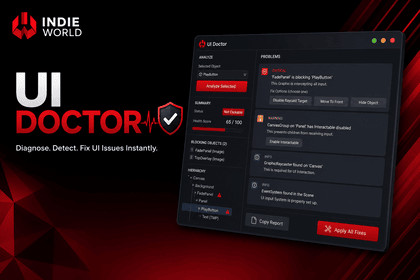
Diagnose Unity UI interaction issues instantly. Detect raycast blockers, Canvas, EventSystem, Input System, and Selectable problems with detailed reports, live inspection, and one-click fixes.Stop Guessing Why Your UI Isn't ClickableUI Doctor is a Unity Editor extension that quickly identifies why a UI element isn't receiving input.Instead of manually checking EventSystems, CanvasGroups, Raycast Targets, sorting orders, or hidden overlays, simply select a UI object and click Analyze Selected. UI Doctor pinpoints the exact issue, explains the cause, and suggests how to fix it.Key FeaturesAnalyze any Button, Toggle, Slider, Dropdown, ScrollRect, InputField, TMP_InputField, or SelectableDetect raycast blockers across multiple canvasesIdentify Canvas, CanvasGroup, EventSystem, and Input System issuesDisplay the exact GameObjects blocking inputLive Raycast Explorer to inspect the UI stack in real timeHealth Score with categorized diagnosticsOne-click fixes with full Undo supportGenerate a shareable diagnostic reportIncludes sample scenes demonstrating common UI problemsWhether you're debugging a prototype or a production project, UI Doctor helps you find and fix UI interaction issues in seconds.DocumentationSupported Unity VersionsUnity 2021.3 LTSUnity 2022.3 LTSUnity 2023.xUnity 6 (6000.x)Supported ComponentsButtonToggleSliderDropdownScrollRectInputFieldTMP_InputFieldAny SelectableDiagnostic ModulesRaycast AnalyzerSelectable AnalyzerCanvas AnalyzerCanvasGroup AnalyzerEventSystem AnalyzerInput System AnalyzerIncludesEditor WindowLive Raycast ExplorerAutomatic Fix SystemRuntime Diagnostic APISample ScenesDocumentationDependenciesUnity UI (UGUI)Optional TextMeshProSupports both Legacy Input Manager and the New Input SystemAI-assisted tools were used during the development process for tasks such as brainstorming, code review, documentation refinement, and workflow optimization. All code, assets, and package functionality were reviewed, validated, and verified before release.

